A potential client might need legal advice at 9 p.m., long after your receptionist has left. If booking a consultation requires waiting until morning, that opportunity could disappear.
Law firm appointment scheduling automation solves this problem by allowing prospective clients to reserve consultations online, receive confirmations, and complete initial intake steps without continuous staff involvement.
But convenience is only part of the story. Legal scheduling involves confidentiality, conflict screening, attorney availability, and sometimes consultation fees. The right system must manage these responsibilities without turning a simple appointment into an administrative burden.
1. How Law Firms Automating Appointment Scheduling
Administrative Work Can Interrupt Billable Activities
Every scheduling conversation requires attention, even when the appointment itself takes only 30 minutes.
Consider a practice handling 40 consultations weekly. If coordinating each appointment requires eight minutes of staff time, that represents more than five hours of scheduling work every week.
This is an illustrative calculation, not an industry average. Actual savings depend on appointment complexity and the firm’s existing procedures.
Automation redirects some of that time toward client communication, case preparation, and other valuable responsibilities.
Clients Expect Convenient Booking Options
Online scheduling gives prospective clients greater control over when they contact a law firm.
Someone researching an estate planning attorney during the weekend can request a consultation immediately rather than remembering to call during business hours.
Automated confirmations also establish clear expectations about meeting locations, virtual consultation links, and required preparation.
The result is a smoother experience before the first attorney-client conversation.
2. Features That Matter Most in Legal Scheduling Software
Two-Way Calendar Synchronization
Reliable synchronization connects scheduling software with tools such as Google Calendar, Microsoft Outlook, or Microsoft 365.
When an attorney becomes unavailable, the booking system should reflect that change. Similarly, newly confirmed consultations should appear on the attorney’s connected calendar.
Firms should verify how frequently calendars synchronize, whether private appointments block availability, and how the platform handles different time zones.
Flexible Availability and Booking Rules
Attorneys rarely have identical schedules.
A litigation attorney may reserve mornings for court appearances, while an estate planning attorney offers consultations during designated afternoon hours.
Scheduling software should support minimum booking notice, daily appointment limits, cancellation windows, and preparation buffers.
A 15-minute interval between consultations, for instance, gives attorneys time to document conversations and review upcoming matters.
Automated Reminders and Rescheduling

Confirmation emails and SMS reminders help clients remember their appointments.
A firm might send confirmation immediately after booking, another reminder 24 hours beforehand, and a final notification two hours before the meeting.
Clients should also have straightforward options to cancel or reschedule.
However, reminders should avoid exposing sensitive legal details through message previews or shared devices.
Consultation Fees and Payment Collection
Some practices require payment before an initial consultation.
Integrated payment systems can collect fees during booking and record the transaction in the appropriate client or accounting workflow.
Firms must distinguish earned consultation fees from advance payments that may require trust-account handling under applicable state rules.
Software should support the firm’s accounting obligations rather than assume every payment belongs in the same account.
3. Automated Scheduling Connect With Client Intake
Scheduling becomes particularly useful when it works alongside client intake automation. A prospective client submits basic contact details, identifies the general legal issue, and selects an appointment type.
The system can then create a CRM record, notify the intake coordinator, and assign preliminary screening tasks.
To keep information consistent across connected legal platforms, firms should understand how to sync law firm client data between apps, including how to synchronize client records, prevent duplicate entries, and maintain accurate information across intake and practice management workflows.
To keep consultation-related communication organized, firms can also learn how to connect law firm CRM to email, allowing appointment confirmations, client correspondence, and follow-up messages to be recorded alongside relevant CRM contact information.
Conflict Screening Must Remain a Controlled Process
Legal practices cannot treat every appointment request as an automatically approved consultation.
The American Bar Association’s Model Rule 1.18 addresses lawyers’ responsibilities toward prospective clients, including confidentiality and potential conflicts of interest.
A booking form should therefore gather only the identifying information needed for preliminary screening.
For sensitive matters, firms can hold appointments as provisional until authorized personnel complete appropriate conflict checks.
Automated screening can identify possible matches, but it should not independently make final ethical determinations.
4. Appointment Scheduling Tools Should Law Firms Consider
The best software depends on whether a firm needs basic appointment booking or a connected legal intake workflow.
Legal-Specific Scheduling Platforms
Clio offers online consultation booking, appointment reminders, and payment capabilities through its supported products.
Lawmatics combines legal calendaring with client intake records and workflow automation. Lawcus provides appointment scheduling connected to legal practice workflows.
LawTap is another legal-focused booking option, including integration opportunities with Actionstep.
These products may suit firms seeking stronger connections between consultations, contacts, and matter management.
General-Purpose Scheduling Platforms
Calendly, Acuity Scheduling, Microsoft Bookings, and Chili Piper offer scheduling and availability-management capabilities.
They can be useful for straightforward consultation booking or coordinating appointments across multiple professionals.
However, legal-specific functions such as conflict screening, matter creation, and specialized accounting may require integrations or additional software.
Before purchasing, firms should test the actual workflow instead of relying exclusively on advertised integrations.
How Can a Law Firm Set Up Scheduling Automation?
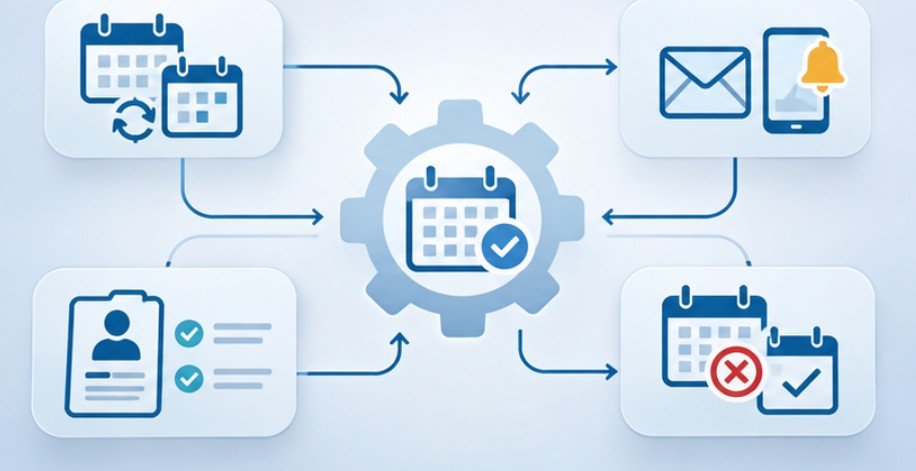
A successful implementation begins with a clearly defined process, not a software subscription.
Step 1: Map Existing Appointment Types
Identify initial consultations, follow-up meetings, document reviews, and existing-client appointments.
Assign appropriate durations, responsible staff, and intake requirements to each category.
Step 2: Configure Calendars and Availability
Connect attorney calendars and establish booking restrictions.
Test the synchronization process by creating overlapping appointments and checking whether the software correctly blocks unavailable periods.
Step 3: Build Secure Intake Forms
Request essential contact information and limited conflict-screening details.
Avoid collecting lengthy case narratives before confirming that appropriate confidentiality procedures are in place.
Step 4: Establish Communication Workflows
Configure confirmations, reminders, cancellation instructions, and internal notifications.
Make sure clients understand whether their appointment is confirmed or pending review.
Step 5: Test the Complete Client Experience
Complete a test booking using a mobile device.
Then change the appointment, cancel it, and verify whether calendar updates and notifications reach the correct recipients.
Include an accessibility review. The U.S. Department of Justice’s web accessibility guidance explains why accessible digital services matter for businesses serving the public.
5. Can Firms Protect Client Information During Automated Booking
Scheduling platforms often process personal contact information and potentially sensitive legal details.
The Federal Trade Commission’s business cybersecurity guidance emphasizes access controls, secure systems, staff awareness, and vendor oversight.
The National Institute of Standards and Technology also recommends protective measures such as multifactor authentication for business-critical accounts.
Law firms should evaluate encryption, employee permissions, retention policies, and third-party data access before connecting scheduling tools.
AI-powered receptionists and chatbots require additional oversight. They may answer routine questions and route inquiries, but they should not provide unsupervised legal advice or independently decide whether representation is appropriate.
6. How Firms Measure Whether Scheduling Automation Works

Instead of measuring success only by appointments booked, practices should examine the complete consultation process.
Useful performance indicators include booking completion rates, scheduling-related staff time, appointment attendance, cancellation frequency, and consultation-to-client conversion. Compare these measures before implementation and again after several weeks.
A higher booking rate offers limited value if unqualified inquiries overwhelm attorneys or clients experience confusing intake procedures.
Firms should also review failed bookings, duplicate records, and incorrectly routed consultations.
Beyond appointment management, firms can improve operational consistency through law firm case management task automation, helping coordinate attorney assignments, follow-up responsibilities, case milestones, and administrative deadlines.
Frequently Asked Questions
1. Can law firm appointment scheduling automation prevent double-bookings?
Yes. Two-way calendar synchronization can block unavailable periods and update bookings, although reliability depends on synchronization settings and the connected platforms.
2. Is automated appointment scheduling suitable for small law firms?
Yes. Solo attorneys and smaller practices can use booking links, availability rules, and reminders without implementing an extensive practice management system.
3. Can clients pay consultation fees when booking appointments?
Many legal scheduling platforms support online payments. Firms should verify payment processing capabilities and applicable state trust-accounting requirements.
4. Can AI schedule appointments for attorneys?
Yes. AI receptionists and chatbots can help answer routine inquiries and arrange consultations. Attorneys must maintain appropriate oversight of confidentiality, conflict screening, and legal advice.
Make Every Consultation Easier to Manage
An effective scheduling system should do more than place appointments on a calendar. It should help prospective clients reach the right attorney, reduce unnecessary administrative work, and preserve the safeguards that legal services require.
I would recommend starting with one appointment category, testing the booking experience carefully, and expanding only after confirming that calendars, intake records, and notifications work together.
The most valuable automation is not necessarily the platform offering the most features. It is the one that removes friction without weakening professional judgment.
A consultation may begin with a simple booking link, but the experience surrounding that link shapes the client’s first impression of the firm.