One student, two identification numbers, and three conflicting enrollment records. What looks like a minor administrative mistake can quickly affect attendance reporting, academic transcripts, financial aid processing, and school funding.
Understanding how to prevent duplicate student records across systems is essential for US schools managing information through student information systems (SIS), admissions CRMs, learning platforms, and state reporting databases.
The solution involves more than deleting repeated profiles. Schools need consistent identification methods, reliable integrations, standardized enrollment procedures, and clear ownership of student information.
Establish One Authoritative Student Record
The first defense against duplicate information is determining which platform controls each category of student data.
For most K–12 districts, the SIS should serve as the authoritative source for enrollment, attendance, student identifiers, and academic records.
Other applications can maintain information relevant to their functions without independently creating conflicting student identities.
Assign Clear Ownership to Every System
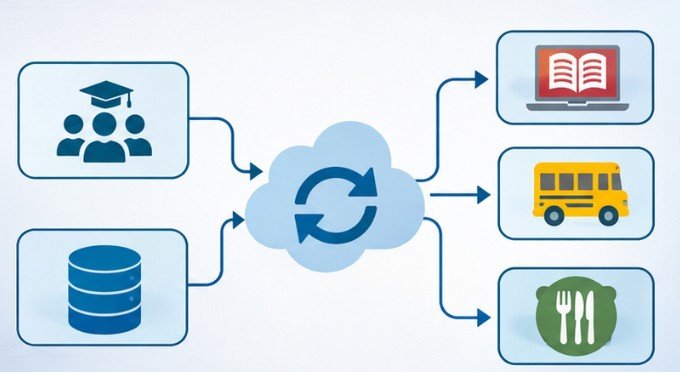
An admissions CRM might control recruitment inquiries, while the SIS maintains official enrollment status. A learning management system (LMS) handles coursework and grades.
These platforms should exchange information through approved integrations rather than maintain unrelated student identities.
A simple ownership policy could establish that the SIS controls student identifiers, the CRM controls recruitment communications, and the LMS controls instructional activity.
Preventing unauthorized spreadsheets and disconnected databases further reduces conflicting information.
However, one source of truth does not mean one database must contain everything. It means each important data field has an identified authoritative owner.
Give Every Student a Persistent Unique Identifier

Names are unreliable database keys. Students can share names, change surnames, use preferred names, or have different spellings across records. A persistent student identification number provides a more dependable connection between platforms.
The National Center for Education Statistics recommends system-generated identification codes without embedded personal information. Such identifiers help connect records while limiting unnecessary exposure of sensitive details.
Schools should distinguish among three identifiers:
- Institutional student ID: The permanent identifier within a school or district.
- State student ID: The identifier used for applicable statewide reporting.
- Application-specific ID: A platform’s internal identifier mapped to the authoritative student ID.
Email addresses should not function as permanent identifiers because they can change, be shared, or become unavailable.
Database unique constraints should prevent two active students from receiving the same institutional identifier.
Importantly, these constraints cannot detect every duplicate person. They must work alongside identity-matching procedures.
Detect Potential Duplicates Before Creating Records
The most effective deduplication strategy begins before a new profile enters the database. Registration software should search existing records whenever staff submit enrollment information.
Combine Exact Matching With Fuzzy Matching
Exact matching identifies records sharing a verified student ID. Fuzzy matching detects similarities that might indicate the same individual despite inconsistent spelling or formatting.
For example, an application might identify similarities between “Jonathan Smith” and “Jon Smith” when additional information supports the match.
Schools can compare legal names, dates of birth, previous schools, and approved contact information. However, matching scores should trigger review rather than automatically combine uncertain records.
Two students can share names and birthdates, especially in large districts. A sensible matching policy separates clear matches, possible matches requiring investigation, and genuinely new students.
Verify Identity Without Creating Enrollment Barriers
Staff should review prior enrollment documentation and permitted identity records before generating new IDs.
Arizona’s guidance specifically recommends investigating spelling variations, multiple surnames, and previously assigned identifiers before creating a new state student ID.
Documentation requirements vary by state and student circumstances. Schools should follow applicable enrollment laws and avoid improperly excluding students who lack particular documents.
Connect Systems Without Creating Conflicting Profiles
Integrations can reduce duplicate entries, but poorly designed synchronization can also spread errors across an entire district.
A reliable integration must recognize whether incoming information represents an existing student or a genuinely new person.
Use Standardized Exchange Methods
The 1EdTech OneRoster standard supports exchanging student, enrollment, course, and grade information using CSV files or REST-based services.
These standardized formats reduce manual data entry and improve interoperability between school applications.
Districts can also use middleware or APIs to coordinate updates among SIS, CRM, LMS, and reporting systems.
Bidirectional synchronization should follow clearly defined field ownership. Allowing every system to overwrite every field can create synchronization loops and conflicting changes.
For example, a CRM may update contact preferences while the SIS remains authoritative for enrollment status. Integration workflows should include validation, duplicate detection, error logging, and retry mechanisms. When a duplicate is resolved, connected systems must receive the surviving student ID and updated mapping.
Build a Repeatable Enrollment Verification Process
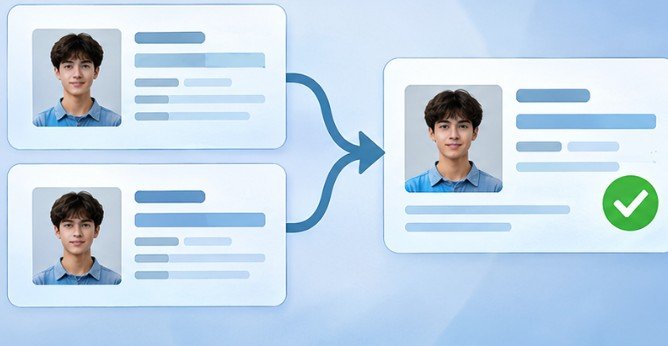
Technology cannot fully compensate for inconsistent registration procedures.
A standardized intake workflow helps schools recognize returning students, transfers, and previously enrolled applicants.
Student enrollment verification checklist
Search the SIS using existing identifiers and name variations.
Check previous enrollment and transfer records.
Verify available identity information against official records.
Review possible matches before creating a new profile.
Assign or confirm the authoritative student ID.
Synchronize the verified record with connected applications.
0 of 6 completed
Reset
This process is particularly valuable during back-to-school enrollment, when districts process large numbers of registrations within short periods.
Staff training should include common spelling variations, student transfers, re-enrollment, and situations requiring escalation.
Audit Existing Records and Resolve Duplicates Safely
Even well-managed schools accumulate occasional duplicate profiles. Regular data-quality audits can identify records sharing identifiers, demographic characteristics, or enrollment histories.
The NCES Forum Guide to Data Quality emphasizes consistent policies, staff responsibilities, and ongoing improvement in education data management.
A useful audit should examine duplicate candidates, unresolved matching alerts, integration failures, and repeated manual corrections.
Never Merge Records Without Reviewing Their Relationships
A duplicate profile might contain valid attendance, grades, accommodations, or historical enrollment information.
Automatically deleting it can cause permanent data loss.
Instead, authorized administrators should identify the surviving record, reconcile related information, preserve an audit trail, and update connected system mappings.
The retired identifier should remain in a controlled reference table when necessary to prevent future imports from recreating the duplicate.
Protect Student Privacy Throughout Deduplication
Identity matching requires access to sensitive information, making privacy controls essential.
Under the Family Educational Rights and Privacy Act (FERPA), access to education records must follow applicable consent requirements or permitted exceptions.
The US Department of Education’s student privacy guidance explains that sharing student information with external parties requires appropriate legal conditions and safeguards.
Schools should restrict matching tools to authorized personnel, encrypt transfers, maintain audit logs, and limit unnecessary collection of personal information.
Social Security numbers should not serve as routine universal matching keys. Privacy and accuracy must improve together, not at each other’s expense.
Frequently Asked Questions
1. What causes duplicate student records?
Duplicate records commonly result from repeated enrollment, inconsistent names, disconnected platforms, manual imports, and missing student identifiers.
2. Can schools automatically merge duplicate student profiles?
Confirmed matches may be merged through controlled workflows. Uncertain matches should receive human review to prevent accidental combinations and lost academic information.
3. How often should schools check for duplicate records?
Automated checks should operate during record creation and synchronization. Additional audits are useful before enrollment reporting deadlines and during high-volume registration periods.
4. How to prevent duplicate student records across systems when students transfer?
Search existing state and district identifiers, verify enrollment history, map the original ID to the receiving system, and investigate uncertain matches before generating another record.
Final Thoughts
Duplicate student records rarely begin as major technology failures. More often, they originate from a rushed registration, an inconsistent identifier, or two systems that do not communicate properly.
Schools can reduce these problems by establishing authoritative records, maintaining permanent identifiers, validating incoming information, and reviewing potential matches before merging profiles.
The most important improvement is consistency. Every department should follow the same identity-management rules, regardless of which application it uses.
A reliable student data system does more than maintain clean databases. It protects academic histories, improves administrative decisions, and ensures each student’s information remains connected throughout their educational journey.