
A newly hired teacher can complete every employment form and still arrive on the first day without a working email account, classroom keys, or access to lesson-planning software. That disconnect reveals why school hiring needs more than digital paperwork.
Understanding how to automate school staff onboarding helps US school districts coordinate hiring documents, background checks, technology access, training, and employee communications through one organized workflow.
Instead of asking HR, IT, and school administrators to exchange dozens of emails, automation assigns responsibilities, monitors deadlines, and moves approved employees through each stage without unnecessary delays.
Why Traditional School Onboarding Creates Problems
School hiring involves responsibilities that ordinary office onboarding rarely includes.
Teachers may need professional licenses, classroom technology, curriculum access, and mandatory training. Substitute teachers require different permissions, while transportation and cafeteria employees follow specialized safety procedures.
The challenge becomes particularly noticeable during summer hiring, when districts must prepare numerous employees before the academic year begins.
Disconnected systems create predictable problems: duplicated information, missing forms, delayed equipment, and uncertainty about who should complete the next task.
Automation addresses these gaps by connecting human resources, payroll, IT, and building administrators while preserving necessary human oversight.
Start With One Digital Employee Record
The most effective onboarding system begins when an applicant formally accepts an employment offer.
Replace Paper Packets With Secure Preboarding
An HR platform can automatically generate an employee profile and send an invitation to a secure, mobile-friendly onboarding portal.
New employees can submit contact information, complete electronic forms, review employment policies, and provide payroll details before their first scheduled workday.
Systems such as Frontline Central and other education-focused onboarding platforms support digital document collection and workflow management.
However, districts should avoid collecting sensitive identification documents through ordinary email attachments.
The portal should support encrypted transmission, permission controls, and documented retention policies.
Keep Federal Employment Requirements on Schedule
Automation must follow federal requirements rather than simply accelerating document collection.
According to US Citizenship and Immigration Services, employees must complete Form I-9 Section 1 no later than their first day of employment. Employers generally must complete Section 2 within three business days of that date.
The Internal Revenue Service also explains the importance of collecting Form W-4 information for federal income tax withholding.
Digital workflows can generate deadline reminders, flag incomplete submissions, and preserve completion records.
Nevertheless, automated forms do not eliminate the employer’s responsibility to verify employment eligibility correctly.
Build Different Onboarding Paths for Different Jobs
A single checklist rarely works across an entire school district.
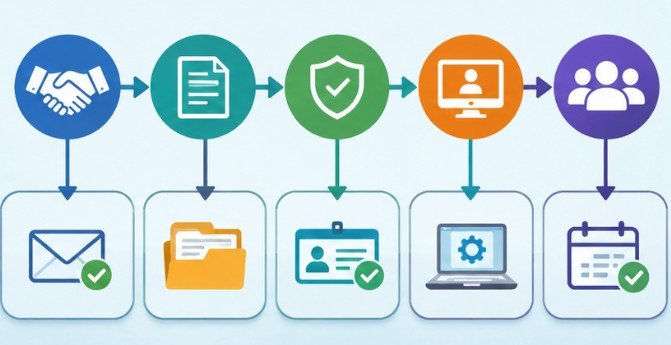
The better approach is to create role-based workflows that automatically adjust according to an employee’s position, department, location, and employment classification.
Separate Instructional and Operational Requirements
Teachers typically need certification verification, curriculum orientation, learning management system access, and classroom preparation.
Substitute teachers may require scheduling-platform access, classroom management training, and instructions for reporting assignments.
Administrative employees need payroll systems, records-management training, and departmental permissions.
Custodial, transportation, and food-service staff may require equipment instruction, workplace safety training, and job-specific certifications.
The US Department of Education confirms that teacher licensing requirements are determined by individual states, making location-specific verification essential.
Connect Background Checks to Approval Decisions
Background screening can be incorporated into the hiring workflow through an approved screening provider.
For example, a completed screening can notify HR that results are available for review.
However, the system should not automatically interpret every screening result as proof of eligibility.
District officials must apply relevant state laws, fingerprinting rules, employment policies, and required review procedures.
Only after appropriate approval should the workflow authorize access to sensitive school systems.
Connect HR Records With IT Account Creation
Technology provisioning is frequently one of the most frustrating parts of employee onboarding.
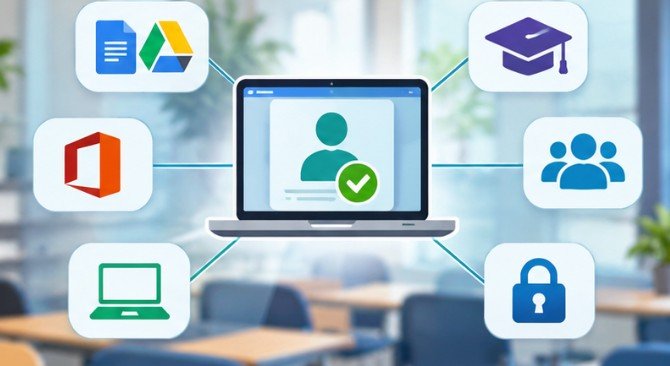
A teacher may be officially hired but unable to access Google Workspace, Microsoft 365, the student information system, or the district’s learning platform.
Use Identity Management to Reduce Manual Requests
Identity management tools can connect an approved HR record with the district’s technology environment.
Platforms such as Okta, BetterCloud, and compatible identity-management solutions can support automated account provisioning.
For example, once HR confirms a teacher’s employment status, the workflow can prepare an email account, assign appropriate security groups, and request classroom technology.
Role-based permissions should determine which applications become available.
Importantly, an accepted offer should not automatically activate unrestricted access to student records.
Protect Student Information During Provisioning
The US Department of Education’s FERPA guidance explains that schools must use reasonable methods to restrict education-record access to officials with legitimate educational interests.
Districts should therefore grant the minimum permissions required for an employee’s responsibilities. Multifactor authentication, approval checkpoints, and access logs offer additional protection.
The Cybersecurity and Infrastructure Security Agency recommends strong authentication and security logging for K–12 technology.
Access should also update automatically when employees transfer departments, change responsibilities, or leave the district.
Automate Equipment, Welcome Messages, and Training
An employee account is only one part of workplace readiness.
School districts must also coordinate devices, identification badges, room keys, orientation schedules, and mandatory training.
Route Equipment Requests Automatically
A completed HR approval can generate an IT service ticket containing the employee’s role, school location, start date, and approved equipment requirements.
Tools such as Microsoft Power Automate, Microsoft Forms, and compatible ticketing platforms can support these workflows.
An IT technician still needs to prepare and verify the equipment, but the request no longer depends on an administrator remembering to send an email.
Make Communication Part of the Workflow
Scheduled messages can prepare employees for their first day.
A week before the start date, the system might send parking instructions, reporting locations, required documents, and orientation details.
During the first week, employees can receive training reminders and introductions to relevant colleagues.
After 30 days, an automated notification can remind the principal or department head to conduct a personal check-in.
These conversations are particularly valuable because employees may encounter problems that automated checklists cannot identify.
A Practical School Staff Onboarding Automation Workflow
Districts do not need to replace every existing system immediately.
A phased implementation provides a manageable starting point.
| Stage | Automated action | Human responsibility |
| Offer accepted | Create onboarding profile | Confirm employment details |
| Preboarding | Send forms and reminders | Review required documents |
| Compliance | Track screening and license status | Verify eligibility |
| IT preparation | Create tickets and prepare accounts | Approve access and test devices |
| First week | Deliver orientation and training reminders | Welcome and support employee |
| First month | Schedule progress check-in | Discuss performance and concerns |
Begin with one employee category, such as newly hired classroom teachers, before expanding automation districtwide.
Test incomplete forms, delayed background checks, changed start dates, and duplicate employee records.
Every exception should have a designated person responsible for resolving it.
How to Measure Whether Automation Works

Districts should evaluate outcomes rather than simply counting completed digital forms.
Track the average time between offer acceptance and onboarding completion, the percentage of employees with working accounts on Day 1, and the number of overdue compliance tasks.
For example, if manual onboarding requires 90 administrative minutes per hire and automation reduces that to 35 minutes, the district saves 55 minutes per employee.
Across 120 hires, that represents 110 administrative hours saved.
This is an illustrative calculation, not a reported district result.
Administrators should also survey new employees about communication, equipment readiness, and training quality.
These findings help identify whether the workflow actually improves the hiring experience.
Common Mistakes That Undermine Automation
Poorly configured automation can introduce new problems.
An incorrect employee classification might trigger inappropriate software permissions. Unreliable integrations may create duplicate records, while excessive reminders can overwhelm new hires.
Some screening, identity verification, accessibility accommodations, and employment decisions also require individual attention.
Districts should establish approval checkpoints, monitor integration failures, and provide an alternative process for employees who cannot access digital forms.
Automation works best when it removes routine work without removing accountability.
Frequently Asked Questions
1. What is the easiest way to automate school employee onboarding?
Start with a secure digital HR portal that collects forms, tracks completion, sends reminders, and assigns tasks to appropriate administrators.
2. Can schools automate employee background checks?
Schools can automate screening requests, status notifications, and document tracking. Final eligibility decisions must follow applicable laws and district review procedures.
3. Which software is useful for school onboarding automation?
Education HR platforms, identity-management tools, Microsoft Power Automate, and IT ticketing systems can coordinate paperwork, account provisioning, and employee communication.
4. Is automated onboarding suitable for small school districts?
Yes. Smaller districts can begin with digital forms, shared workflow tracking, and automated reminders before investing in advanced integrations.
Final Thoughts
School onboarding should prepare employees to serve students, not force them to spend their first week searching for passwords, documents, and equipment.
The strongest approach to how to automate school staff onboarding combines secure digital records, role-specific requirements, controlled technology access, and timely communication.
Districts should begin by identifying their most frequent onboarding delays, assigning clear responsibilities, and testing one automated workflow before expanding.
Compliance checks and personal introductions still deserve human attention.
Ultimately, successful automation is not measured by how quickly paperwork disappears. It is measured by whether every new employee arrives informed, equipped, authorized, and ready to contribute.