

A school can invest thousands of dollars in educational software and still struggle with disconnected classrooms, duplicate student records, and endless password resets. The problem often isn’t the technology itself. It’s how those systems communicate.
Understanding how to integrate multiple edtech platforms helps US schools connect learning management systems, student databases, assessment tools, and communication applications into one efficient digital environment.
The most effective approach combines centralized authentication, automated data synchronization, and recognized interoperability standards. When these elements work together, teachers spend less time managing software, IT teams handle fewer repetitive tasks, and students experience smoother digital learning.
Start With a Technology Audit Before Connecting Anything
Successful integration begins with understanding which applications the school actually uses. District administrators should inventory student information systems (SIS), learning management systems (LMS), assessment platforms, communication tools, and classroom applications.
For each platform, document its purpose, annual cost, administrator, supported integrations, and types of student information collected.
Identify Overlapping Features and Unnecessary Subscriptions
Two applications may provide nearly identical capabilities, such as digital quizzes or parent messaging. Maintaining both can increase expenses, complicate training, and create duplicate data. Schools should compare actual classroom usage before renewing contracts.
A useful evaluation considers whether each application improves learning, integrates with existing infrastructure, and provides capabilities unavailable elsewhere.
This process creates a smaller, more manageable technology ecosystem.
Build a Shared Foundation for School Applications
Schools researching how to integrate multiple edtech platforms should prioritize three technical foundations: identity management, interoperability standards, and automated data exchange.
Each addresses a different integration challenge.
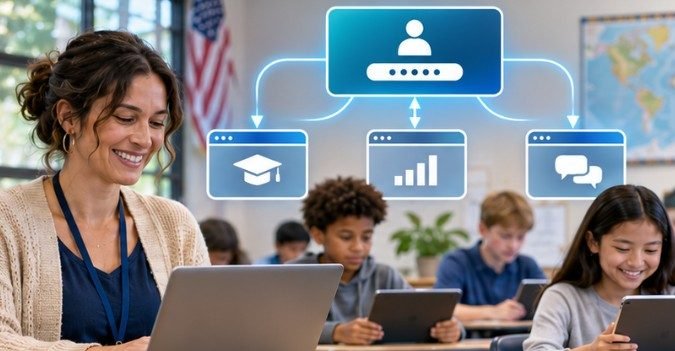
Centralize Logins Through Single Sign-On
Single sign-on (SSO) allows students and educators to access connected applications through a central identity system.
Platforms such as Google Workspace for Education, Microsoft Entra ID, Clever, and ClassLink support different approaches to centralized authentication.
For example, a district using Google Workspace may configure compatible learning applications to authenticate through its existing accounts.
Students avoid repeatedly entering separate credentials, while IT administrators gain greater control over account access.
However, SSO does not automatically synchronize grades, assignments, or enrollment information.
Those functions require additional integrations.
Use Standards That Allow Applications to Communicate
Educational interoperability standards establish consistent methods for exchanging information between different systems.
The nonprofit 1EdTech Consortium maintains specifications designed for educational technology integration.
Three important standards serve distinct purposes.
| Standard | Primary function | Typical application |
| LTI | Connects learning tools with supported LMS platforms | Launching an assessment application from Canvas |
| OneRoster | Exchanges enrollment, roster, and supported gradebook data | Synchronizing SIS class lists |
| Edu-API | Supports academic data exchange in higher education | Connecting university SIS and campus systems |
Learning Tools Interoperability (LTI) can simplify access to external instructional resources.
OneRoster helps districts maintain consistent student and classroom information across compatible applications.
Schools should confirm which standard versions and features vendors actually support before purchasing software.
Connect Student Records Through Automated Data Synchronization
A Student Information System usually serves as the authoritative source for enrollment, class assignments, and essential student records. Connecting that system to other educational applications reduces repetitive administrative work.
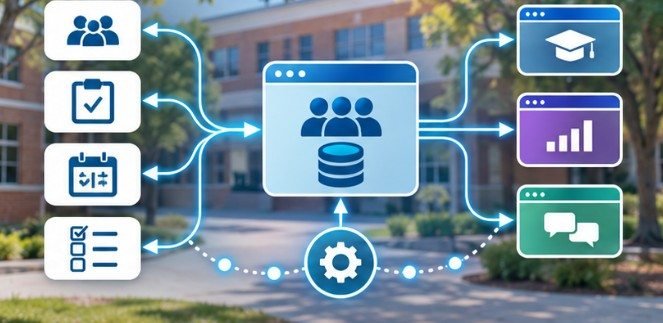
How API-Based Integration Works
An application programming interface (API) allows authorized software systems to exchange defined information. Imagine a student transferring into a US middle school.
After an administrator creates the enrollment record, an approved integration can provision the student’s account, assign appropriate classes, and update connected learning applications.
Without automation, school employees might repeat those actions across several platforms.
APIs can reduce this duplication, although synchronization speed depends on the vendor’s configuration and available features.
When Scheduled File Transfers Still Make Sense
Not every school application supports modern APIs. Older systems may require CSV exports, secure file transfers, or scheduled batch synchronization. These approaches remain useful when real-time updates are unnecessary.
However, districts should monitor failed imports, missing records, and outdated enrollment information. An integration that silently stops updating can create more confusion than a clearly documented manual process.
Protect Student Information Throughout the Integration Process
Connecting educational platforms increases the number of systems that potentially handle sensitive student information. Privacy reviews should therefore happen before any student data is shared.
Under the Family Educational Rights and Privacy Act (FERPA), schools must meet applicable requirements when providing education records to outside technology vendors.
The US Department of Education’s student privacy guidance explains conditions under which contractors may qualify as school officials, including institutional control over the use and maintenance of education records.
Administrators should establish vendor agreements, restrict unnecessary data sharing, and review access permissions.
Security measures should also include encryption, appropriate multifactor authentication, account deactivation procedures, and activity monitoring.
Centralized authentication simplifies access management, but it does not replace ongoing cybersecurity oversight.
A Practical Integration Plan for US School Districts
Schools can reduce implementation risks by connecting applications gradually rather than migrating everything simultaneously.

Phase 1: Map existing data flows
Identify which system owns enrollment, identity, grading, and attendance information. Document where information must travel.
Phase 2: Verify vendor compatibility
Confirm supported APIs, SSO protocols, interoperability certifications, licensing requirements, and technical support availability.
Phase 3: Pilot a limited integration
Test with approved accounts, representative classes, and appropriate safeguards. Verify rostering, permissions, and synchronization behavior.
Phase 4: Measure performance
Monitor login failures, synchronization errors, support requests, and staff time spent correcting information.
Phase 5: Expand and train
Introduce additional applications after successful testing. Provide practical guidance for teachers and administrators.
For universities, the EDUCAUSE Third-Party Integrations Governance and Process Guide provides additional guidance on managing integration requests and institutional responsibilities.
How to Know Whether Your Integrations Are Actually Working
A connected dashboard does not necessarily mean the underlying systems exchange accurate information. Districts should perform regular operational checks.
For example, create a controlled test involving an approved demonstration student account. Update its class assignment in the SIS and confirm that the expected change reaches connected applications.
Check whether removed access permissions take effect and whether synchronization failures generate alerts. Schools can also compare support ticket volumes before and after implementation.
The strongest evidence of success is not the number of connected applications. It is whether those connections reduce administrative effort while maintaining reliable information.
Common Integration Mistakes Schools Should Avoid
One frequent mistake is assuming that every application advertising API compatibility will work seamlessly with existing software.
Integration capabilities vary by vendor, licensing tier, and supported data fields. Another problem is connecting applications without defining which system controls each record.
If two platforms can independently overwrite enrollment information, synchronization conflicts may appear.
Schools should also avoid retaining outdated accounts or granting vendors unnecessary permissions.
Finally, integrations should support accessible learning experiences. A technically connected platform still needs to accommodate students with disabilities and different device or connectivity needs.
Frequently Asked Questions
1. What is the easiest way to integrate multiple EdTech platforms?
Start with centralized authentication and automated SIS rostering. Then connect compatible learning applications using established standards such as LTI and OneRoster.
2. Can schools integrate EdTech tools without coding?
Yes. Many vendors offer built-in integrations, managed connectors, and configuration-based synchronization. Custom development may still be necessary for unsupported or legacy systems.
3. Is single sign-on enough to connect educational applications?
No. SSO manages authentication, while APIs and interoperability standards support information exchange, roster synchronization, and other application functions.
4. How can schools prevent integration-related data breaches?
Apply least-privilege access, review vendor agreements, encrypt information, enable appropriate multifactor authentication, and monitor integrations for suspicious activity.
The Best School Technology Works Together, Not Separately
Learning how to integrate multiple edtech platforms is ultimately about improving educational operations rather than increasing technical complexity.
Schools achieve better results when they evaluate existing software, establish reliable data connections, protect student information, and test integrations before expanding them.
The goal should never be to connect every available application. Instead, districts should build a carefully managed ecosystem that supports teaching without creating unnecessary administrative responsibilities.
Start by identifying one frustrating manual process, such as classroom rostering or account provisioning, and automate it responsibly.
A successful integration strategy becomes visible when teachers can focus on students instead of troubleshooting disconnected software.


