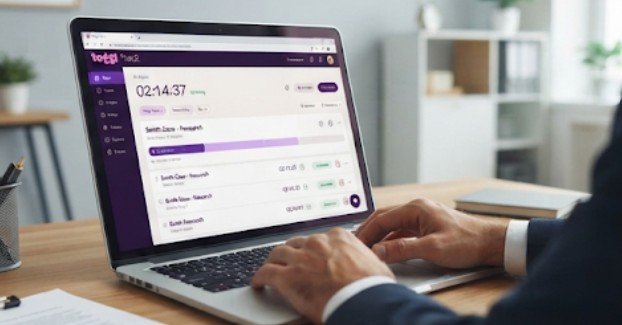
A law firm can record every billable minute accurately and still lose revenue if those hours never reach its billing system. That disconnect is a common risk when attorneys track work in Toggl Track but prepare invoices through Clio Manage.
Understanding how to sync time entries from Toggl to Clio helps eliminate repetitive data entry, prevent missing billable hours, and keep client invoices accurate.
Although Toggl Track and Clio Manage do not offer a built-in direct synchronization, firms can connect them through Zapier, Make, specialized integrations, or CSV transfers. The most important decision is not simply how to move the data, but how to preserve its accuracy.
Three Practical Ways to Transfer Toggl Time Entries Into Clio
The right integration depends on transaction volume, available technical expertise, and billing complexity.
1. Use Zapier for Straightforward Automation
Best for: Small and midsize law firms seeking a low-code integration.
Zapier connects Toggl Track and Clio through automated workflows called Zaps. Its integration supports Toggl activity triggers and Clio time-entry creation actions.
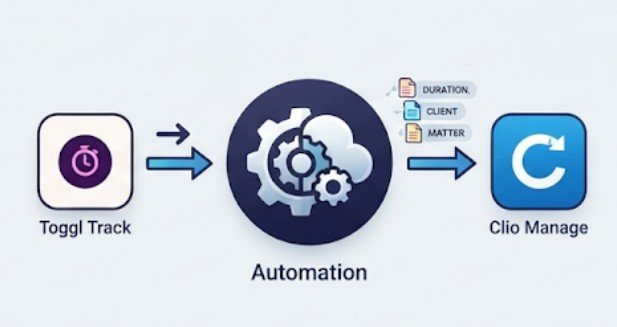
A typical workflow looks like this:
Toggl Track
Completed time entry
Zapier
Validate entry and match matter
Clio Manage
Create billable or nonbillable activity. To configure it, connect both accounts, select an appropriate Toggl trigger, and choose Clio’s Create Time Entry action.
Map the entry’s date, duration, description, responsible user, and matter. Add a filter to prevent unfinished timers from generating premature billing records.
Run a controlled test before activating the workflow.
Zapier is convenient, but polling delays, subscription limits, and incomplete field mappings may require additional configuration.
2. Choose Make for Complex Matter Mapping
Best for: Firms managing multiple practice areas, attorneys, or billing arrangements.
Make offers a dedicated template that watches Toggl entries and creates corresponding Clio Manage activities.
Make
Its visual scenarios support conditional processing, data transformations, and multiple workflow branches.
For example, a firm might configure separate rules for litigation, estate planning, and corporate matters.
A scenario could automatically reject entries without a valid matter number, route administrative time to a nonbillable category, or flag unusually long sessions for review.
Make also offers workflows that create Toggl projects from new Clio matters, reducing manual setup.
Make
However, more sophisticated automations require stronger monitoring and maintenance.
3. Transfer Time Through CSV Files
Best for: Occasional migrations, monthly transfers, or firms avoiding recurring automation costs.
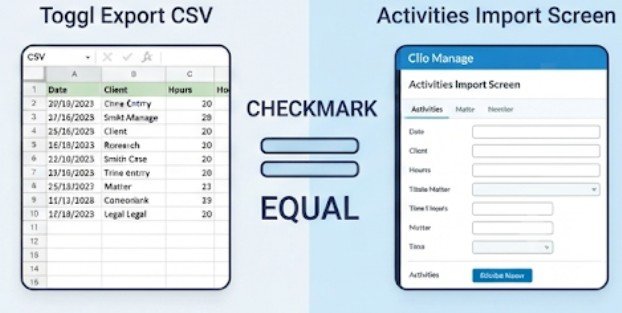
Toggl’s Detailed Report allows users with eligible plans to export individual time entries as CSV files.
Clio Manage also supports bulk activity imports using a dedicated migration template.
Home
To transfer records:
- Filter Toggl entries by billing period.
- Export the Detailed Report in CSV format.
- Convert the fields to Clio’s required activity-import structure.
- Check attorney assignments, matter IDs, dates, and durations.
- Import through Clio’s supported activities migration process.
- Reconcile imported totals against the original report.
Unlike continuous automation, this method requires deliberate handling of every transfer.
How to Sync Time Entries From Toggl to Clio Step by Step
Successful synchronization begins with consistent data structures, not automation software.
Step 1: Establish a Unique Matter Identifier
Each Toggl project should correspond to one identifiable Clio matter. Avoid relying solely on client names. One client may have several open matters, making name-based matching unreliable.
Instead, use a standardized project naming convention incorporating the Clio matter number.
For firms maintaining several connected systems, a consistent identifier also simplifies workflows described in building a white-label integration marketplace.
Step 2: Define the Billing Data Fields
Confirm that each transferred entry contains the essential information:
- Timekeeper and associated client matter
- Service date and recorded duration
- Meaningful activity description
- Billable or nonbillable designation
- Applicable billing rate or activity category
Do not assume the Toggl user automatically matches the correct Clio timekeeper.
Step 3: Configure Duration and Billing Rules
Toggl may represent duration in seconds, while downstream workflows expect hours or another format.
For example, a 5,400-second entry equals 90 minutes, or 1.5 hours.
A poorly configured conversion could produce a dramatically inaccurate invoice.
Preserve the original duration, apply the firm’s approved billing increment rules, and verify the resulting Clio value.
The Legal Information Institute at Cornell Law School explains the professional requirement that attorney fees remain reasonable. Automated rounding therefore requires the same scrutiny as manual billing.
Step 4: Prevent Duplicate Activities
A repeated automation trigger can generate duplicate Clio records. Store each Toggl time-entry ID alongside its corresponding Clio activity ID in a secure mapping database or workflow data store.
Before creating another activity, check whether that source entry has already transferred.
For updated or deleted entries, define separate handling rules rather than assuming a new-entry workflow provides two-way synchronization.
Step 5: Test Before Processing Live Client Data
Create a small test batch covering billable time, nonbillable work, multiple matters, and corrected durations.
Compare the original entries with Clio’s Activities screen. Only enable routine synchronization after confirming that records appear under the correct matters and users.
Which Specialized Legal Integrations Are Worth Considering?

General automation tools are not always sufficient for sophisticated billing operations. Specialized products may support matter-based rollups, consolidated entries, or additional timekeeping functions.
For example, Caddi describes workflows that organize Toggl time by matter before sending information into Clio. TimeSentry, listed in Clio’s App Directory, provides Clio timekeeping synchronization capabilities. However, its listing alone does not establish direct Toggl compatibility.
Evaluate products according to matter matching, duplicate prevention, synchronization direction, audit history, and error recovery.
Firms handling contingency matters may also need workflows connecting time records with automated settlement statement calculations, without confusing tracked hours with amounts actually owed.
Protecting Confidential Client Information During Synchronization
Automating legal timekeeping introduces confidentiality concerns because activity descriptions may contain privileged information.
The National Institute of Standards and Technology recommends risk-based API protection, including appropriate security controls throughout deployment and operation.
Firms should limit integration permissions, avoid unnecessary client details in descriptions, and maintain access logs.
The Federal Trade Commission also recommends evaluating vendors, restricting data access, and regularly reviewing security practices.These precautions complement other law firm compliance processes, including automated anti-money laundering checks.
Security reviews should occur before connecting production accounts, not after confidential information has already transferred.
Frequently Asked Questions
1. Can Toggl Track connect directly to Clio Manage?
There is no standard built-in direct synchronization. Firms can connect the platforms through Zapier, Make, compatible third-party services, or supported CSV import workflows.
2. Does syncing Toggl entries automatically generate invoices?
No. Transferred time becomes Clio activity data. Invoice preparation, billing approval, applicable rates, and client charges remain subject to Clio’s billing workflow.
3. Can firms synchronize previously recorded Toggl hours?
Yes. Historical entries can be processed through appropriately configured automation or CSV migration, provided duplicates, matter assignments, and billing dates are checked.
4. Is Zapier or Make better for legal timekeeping?
Zapier generally suits straightforward transfers. Make offers greater flexibility for complex conditions, transformations, and matter-specific routing. The better choice depends on workflow complexity.
Make Every Recorded Minute Accountable
Learning how to sync time entries from Toggl to Clio is ultimately about protecting billing accuracy rather than simply eliminating administrative work.
A reliable system carries complete time records into the correct matters, identifies duplicates, preserves approved billing rules, and gives administrators visibility into failed transfers.
For smaller practices, a carefully configured Zapier workflow may be sufficient. Larger firms may benefit from Make or specialized legal integrations.
Start with one attorney, one matter, and a small batch of verified entries. Expand only after the records reconcile.
The real measure of successful automation is not how quickly information moves, but whether every legitimate billable minute reaches the right invoice.