One duplicated matter number can create confusion across billing records, client documents, and case management platforms. The problem becomes especially serious when several applications independently assign identifiers to the same legal matter.
Understanding how to automate legal matter numbering across apps starts with one essential decision: designate a single system to generate official matter IDs and make every connected application use those identifiers.
Rather than manually updating spreadsheets, document folders, and accounting software, law firms can synchronize matter numbers through integrations, APIs, and automated workflows. The result is more consistent recordkeeping, fewer administrative corrections, and a reliable connection between client information and legal operations.
Build a Numbering System That Survives Software Changes
Before automating anything, firms should establish a numbering convention that remains reliable as clients, attorneys, and practice areas change.
Keep Permanent Identifiers Separate From Matter Descriptions
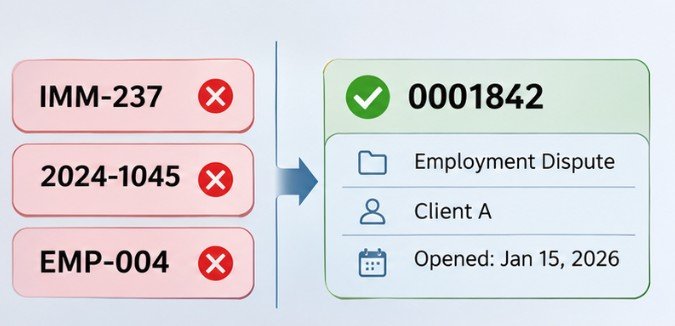
Consider a matter assigned the identifier 0001842.That number can remain unchanged even when the responsible attorney changes or the case moves between departments.
A descriptive matter label might read:
0001842 | Employment Dispute | Client A
The label can change while the official identifier remains constant. Some firms prefer formats such as 2026-001842, combining a year with a sequence. These are workable when the year represents a permanent attribute, such as the opening year, rather than something that may change.
The safest approach is to maintain a stable internal ID alongside a human-readable matter number. This becomes particularly valuable during software migrations.
Establish Rules Before Generating Numbers
A practical numbering policy should specify:
- Whether numbering applies firmwide or separately by office.
- Which system issues the next available number.
- Whether cancelled matters retain their assigned identifiers.
- How imported historical files preserve existing references.
- Who can correct numbering mistakes.
Avoid reusing numbers from deleted or cancelled matters. Maintaining historical uniqueness makes audits and record searches more dependable.
Choose One Application to Control Matter IDs
The most important architectural decision is selecting the authoritative application.
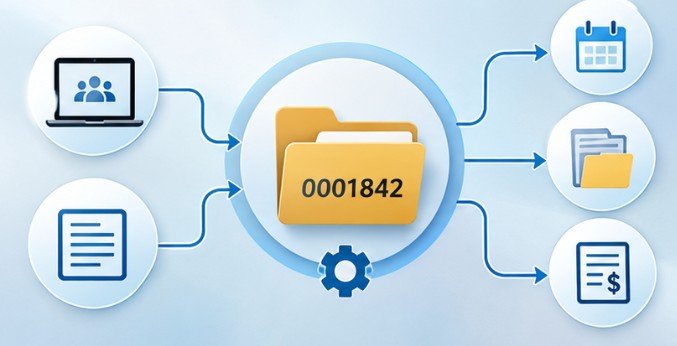
Practice Management Software as the Primary System
Platforms such as Clio Manage and LEAP offer matter-numbering capabilities, although configuration and integration options vary.
When a matter becomes active, the practice management system can generate its official identifier.
Other applications then receive that identifier rather than independently creating competing numbers.
This approach works particularly well for firms that organize billing, calendars, documents, and client records around practice management software.
CRM-Based Numbering for Intake-Heavy Firms
Some firms begin their workflows in Lawmatics or another client relationship management platform.
In these environments, the CRM can initiate the matter creation process after intake approval.
However, a prospective lead should not automatically receive an official legal matter number if the firm has not completed required checks or accepted the representation.
Instead, maintain a separate lead identifier until matter creation is approved. For firms modernizing their intake process, automating law firm client onboarding can help connect approved intake records with downstream workflows.
How to Automate Legal Matter Numbering Across Apps: A Practical Workflow
The following implementation method works with many legal technology environments, provided the applications support the necessary integrations.
Step 1: Audit Your Existing Software
Identify every application that creates, stores, displays, or modifies matter identifiers. Common examples include Clio, Lawmatics, SimpleLegal, SharePoint, Microsoft Excel, and billing platforms.
Determine whether each application supports native integrations, API access, webhooks, or custom fields. Also identify systems that automatically overwrite incoming identifiers.
Step 2: Create the Official Matter Number
Configure the designated source system to generate a unique matter identifier after the appropriate intake approval. For example, a law firm opens a new employment matter, and its practice management platform assigns 0001842.
Store that number with the system’s internal record ID. The two values may differ, but their relationship must remain consistent.
Step 3: Trigger Cross-Application Synchronization
Use a native integration, Zapier, Microsoft Power Automate, or a custom API connection to detect approved matter creation.
An example workflow looks like this:
Approved client intake
CRM sends matter creation request
Primary matter system
Assigns official ID 0001842
CRM
Reference updated
Documents
Folder linked
Billing
Matter ID stored
Each destination receives the same official reference.
For custom implementations, webhooks can notify connected systems when records are created or updated. Firms should verify that their chosen platform actually exposes the required event.
Step 4: Prevent Duplicate Records
Duplicate prevention requires more than sequential numbering. If an integration retries after a network interruption, it must recognize the original request instead of creating another matter.
Use an idempotency key or unique source-record reference, combined with database uniqueness checks, where supported.
If the destination also generates automatic numbers, configure its manual-number or external-reference capabilities where available. Never assume every platform permits overriding its internal numbering.
Step 5: Verify Every Successful Synchronization
Record whether each destination accepted the matter number. Log the source record, destination record, event timestamp, synchronization result, and error details.
The National Institute of Standards and Technology’s SP 800-53 framework addresses access controls, audit accountability, and information integrity—principles applicable to dependable integration architecture.
Test the Workflow Before Launching Firmwide

A small pilot can reveal problems that routine demonstrations overlook. Create ten test matters, including duplicate submissions, missing client details, cancelled intake requests, and temporary connection failures.
Verify that every accepted matter receives exactly one official number and that retries do not produce additional records.
A simple performance measure is:
SyncSuccessRate=CorrectlySyncedMattersEligibleMatters100
If 48 of 50 eligible test matters synchronize correctly, the success rate is 96%.
Investigate both failures before expanding the automation. Also test what happens when an external application becomes unavailable. Failed updates should enter a retry queue or staff review process rather than disappearing silently.
Protect Confidential Information Across Integrations
Matter identifiers are operational references, but associated records may contain confidential information. The ABA Model Rule 1.6 requires lawyers to make reasonable efforts to protect information relating to client representation. State-specific professional obligations also apply.
Use restricted API permissions, encrypted connections, secure credential storage, and role-based access.
The Federal Trade Commission’s business security guidance similarly emphasizes limiting unnecessary data collection and restricting access to sensitive information. Avoid inserting confidential client names into integration logs or widely accessible folder paths.
Handle Legacy Matters, Mergers, and Exceptions
Historical matter records often create the greatest migration challenges. Before modifying an existing numbering scheme, export records and document current mappings.
Maintain a cross-reference between old and new identifiers rather than overwriting historical references without traceability.
For ambiguous matches, require staff approval. An additional consideration comes from ISO/IEC 18975:2024, which addresses approaches to encoding and resolving globally unique identifiers through HTTP URIs.
Although not a legal matter numbering standard, it illustrates why separating permanent identity from displayed labels supports interoperability.
Law firms should also preserve external court case numbers, billing references, and regulatory identifiers as distinct fields. A matter number is not a substitute for every other legal reference.
Frequently Asked Questions
1. Can Zapier automatically assign legal matter numbers?
Yes, when connected applications expose suitable triggers and actions. Ideally, Zapier retrieves the official identifier from the authoritative system instead of generating competing numbers.
2. What is the best numbering format for law firms?
A permanent sequential identifier is generally easier to maintain. Optional prefixes or descriptions can provide context without changing the underlying record identity.
3. How do you prevent duplicate matter numbers?
Use one authoritative numbering source, unique-field validation, idempotent integration requests, and automated exception reporting.
4. Can existing matter numbers be synchronized across platforms?
Yes, where import and integration features permit it. Preserve historical mappings, test carefully, and back up records before making changes.
Make Every Matter Traceable
A matter number should function as a dependable reference, not another piece of information employees must repeatedly correct.
The strongest automation strategy combines permanent identifiers, one authoritative numbering system, controlled integrations, and consistent error monitoring.
For smaller practices, a native integration may provide everything necessary. Larger firms may need API-driven workflows, historical mapping databases, and more sophisticated validation.
Either way, begin with a limited pilot and verify records across intake, documents, and billing before expanding.
The goal is not simply to generate numbers faster. It is to make every matter consistently identifiable wherever the firm’s work happens.