

A law firm can have thousands of dollars in unpaid replenishment requests while its billing team remains unaware that client retainers are running low. The problem often starts with a simple delay: someone notices a declining balance but forgets to contact the client.
Learning how to automate retainer replenishment reminders helps US law firms prevent these gaps through balance alerts, scheduled notifications, and consistent payment follow-ups.
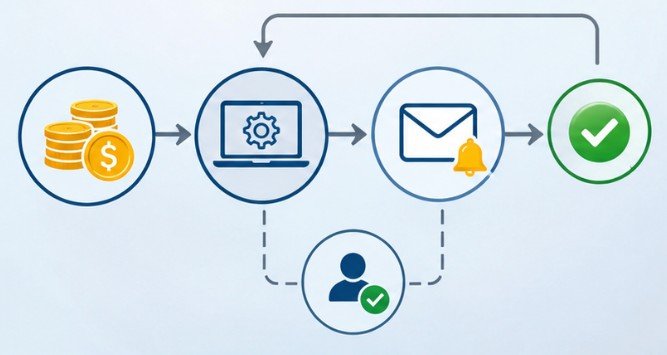
The process is straightforward: establish a minimum retainer balance, connect it to a billing workflow, and automatically notify clients when additional funds are needed. The challenge is making those reminders accurate, professional, and compliant with legal accounting requirements.
How to Automate Retainer Replenishment Reminders Step by Step
A reliable system starts with clearly defined financial conditions rather than a complicated collection of software integrations.
Step 1: Establish a Minimum Retainer Balance
Determine the amount that should trigger a funding request. For example, consider a law firm requiring clients to maintain a $5,000 advance-fee balance. Its engagement agreement specifies that replenishment is requested when the available balance reaches $1,500.
Once the accounting system records a balance at or below that threshold, the reminder workflow can begin. Thresholds should reflect expected legal expenses, billing frequency, and the client’s written agreement. Firms can also calculate a practical minimum using anticipated weekly expenses.
If a matter typically incurs $600 in weekly charges, maintaining a $1,800 reserve provides approximately three weeks of coverage at that spending rate.
Step 2: Select the Appropriate Automation Trigger
Not every retainer operates under the same billing arrangement. Balance-based triggers work best for evergreen retainers, where clients maintain an agreed minimum amount throughout representation.
Date-based triggers suit recurring contractual retainers or service agreements with established renewal dates. For these arrangements, reminders might be scheduled 30, 60, or 90 days before renewal.
Firms can combine both methods when contracts include recurring payments and minimum funding requirements. However, renewal notifications and replenishment requests should remain distinct because they address different financial obligations.
Step 3: Connect Billing Records to Notification Tools
Legal practice management platforms may already provide retainer monitoring, accounting integrations, or customizable billing notifications.
Start by checking the existing software before purchasing additional applications. Platforms such as Clio, AbacusLaw, and other legal billing systems offer different accounting capabilities, although specific reminder functions depend on the product and subscription.
Smaller firms can use spreadsheets or project boards to monitor balances and renewal dates.
Workflow platforms such as Zapier can connect supported billing records to email systems, internal notifications, and follow-up schedules.
The critical requirement is a reliable, up-to-date financial data source. A spreadsheet containing yesterday’s balance should not automatically override today’s confirmed payment.
Step 4: Prepare Clear Client Notifications

Automated messages should explain the funding requirement without sounding like collection threats. A useful reminder identifies the relevant matter, current available balance, agreed replenishment amount, and payment instructions.
For example:
“Your available retainer balance is $1,250, below the agreed $1,500 minimum. Under your engagement agreement, an additional $3,750 is requested to restore the balance to $5,000.”
Include a secure payment portal and billing contact. The ABA’s Rule 1.5 emphasizes communicating fee arrangements and expenses clearly.
Automated notices should reflect those existing arrangements rather than introduce unexpected financial obligations.
Build a Follow-Up Sequence That Stops After Payment
A single notification may be overlooked. Repeated messages after payment can be equally damaging.
An effective workflow uses payment status to control communication.

| Workflow stage | Suggested timing | Automated action |
| Initial alert | Balance reaches minimum | Generate replenishment notice |
| First follow-up | 3 days later | Check payment status and send reminder if unpaid |
| Second follow-up | 7 days later | Notify client and billing administrator |
| Escalation | 10 days later | Assign personal follow-up to responsible staff |
| Payment received | Upon verified posting | Cancel pending reminders |
These intervals are operational examples, not legal deadlines.
Before sending any follow-up, the system should verify whether payment has already been received, is pending, or requires reconciliation.
It should also prevent duplicate notifications when the same balance threshold appears in multiple daily reports.
Protect Client Funds and Confidential Information
Automation should improve administrative consistency without replacing professional oversight.
Separate Reminders From Financial Transactions
Sending a payment request does not authorize an automatic withdrawal. The Consumer Financial Protection Bureau explains that automatic bank withdrawals require payment authorization.
Law firms considering recurring electronic payments should verify applicable authorization rules, payment-processing restrictions, and state trust-account requirements.
Add Human Approval for Sensitive Matters
Require billing staff or attorneys to review notices when balances are disputed, invoices are being corrected, or clients have negotiated alternative arrangements.
This approval step prevents automated systems from sending misleading demands. For email communications, the Federal Trade Commission’s CAN-SPAM guidance distinguishes transactional messages from promotional communications. Keep replenishment notices focused on existing payment obligations instead of mixing them with marketing promotions.
Secure the Automation Workflow
Billing records can reveal sensitive client relationships and financial information. Limit access to authorized employees, protect integrations, and avoid putting confidential matter details into unnecessary notifications.
The National Institute of Standards and Technology recommends measures including multifactor authentication, backups, and cybersecurity safeguards. Use secure client portals whenever detailed billing information must be shared.
Test the System Before Sending Real Reminders
Before activating client-facing automation, simulate common billing situations. Test a balance falling below the threshold, a payment arriving shortly afterward, and a matter being closed.
Also test partial payments, duplicated accounting entries, pending bank transfers, and clients with multiple active matters. Confirm that notifications stop when balances are restored and that disputed accounts reach a human reviewer.
Review the workflow periodically as fee agreements, software permissions, and billing policies change. A practical performance measure is the number of incorrect reminders generated each month. Reducing those errors matters as much as collecting replenishments promptly.
Frequently Asked Questions
1. Can small law firms automate retainer replenishment reminders?
Yes. Small firms can use existing legal billing features, spreadsheets, or workflow tools to monitor balances and trigger notifications without purchasing enterprise software.
2. What balance should trigger a replenishment reminder?
Use the minimum specified in the engagement agreement. Consider projected legal expenses, average billing activity, and the time clients reasonably need to replenish funds.
3. Can Zapier send automatic retainer reminders?
Yes, when compatible billing data or supported triggers are available. Configure conditions, notification templates, payment-status checks, and follow-up actions before enabling client messages.
4. Should retainer replenishment payments be collected automatically?
Only when properly authorized and permitted under applicable rules. Automated reminders are different from automatic payment collection, particularly when client trust accounts are involved.
Final Thoughts
A missed replenishment reminder can become a billing dispute, a cash-flow problem, or an uncomfortable client conversation. Yet solving the issue rarely requires expensive software.
The strongest approach combines accurate trust-account records, agreed funding thresholds, timely notifications, and clear human oversight.
Start with one retainer arrangement, test its reminders, and expand only after verifying that every message reflects the correct financial information.
Ultimately, successful automation is not about contacting clients more frequently. It is about making sure the right client receives the right request at the right moment, without compromising accuracy, trust, or professional responsibility.



One thought on “How to Automate Retainer Replenishment Reminders Without Billing Delays”