

Three years ago, I audited a B2B software company losing $8,600 every month to declined credit cards. Customers loved the product, yet involuntary churn sat at a painful 4.8%. Implementing dunning and failed payment recovery workflow automation cut that churn to 1.1% inside two billing cycles.
Most businesses lose revenue because they treat every declined transaction identically. Well-configured automated workflows routinely recover 60% to 80% of failed payments without manual intervention. Below is the exact technical architecture, 14-day outreach sequence, and infrastructure stack I use to stop involuntary churn cold.
Why Manual Follow-Ups Bleed Recurring Revenue
Chasing failed payments through spreadsheets and manual emails fails at scale. When a recurring charge bounces, waiting three days for a finance manager to notice ruins your recovery odds.
Customer intent drops fast once a card declines. Meanwhile, card issuers block rigid, repeated retry attempts as suspected fraud. For any growing saas subscription business, involuntary churn quietly erodes net dollar retention faster than product cancellations ever will.
Automating the response closes the gap between a failed webhook and a recovered invoice. You protect cash flow while keeping your accounting clean—especially when syncing recovered invoices with your automated sales tax calculation engine.
Core Architecture of Failed Payment Recovery Automation
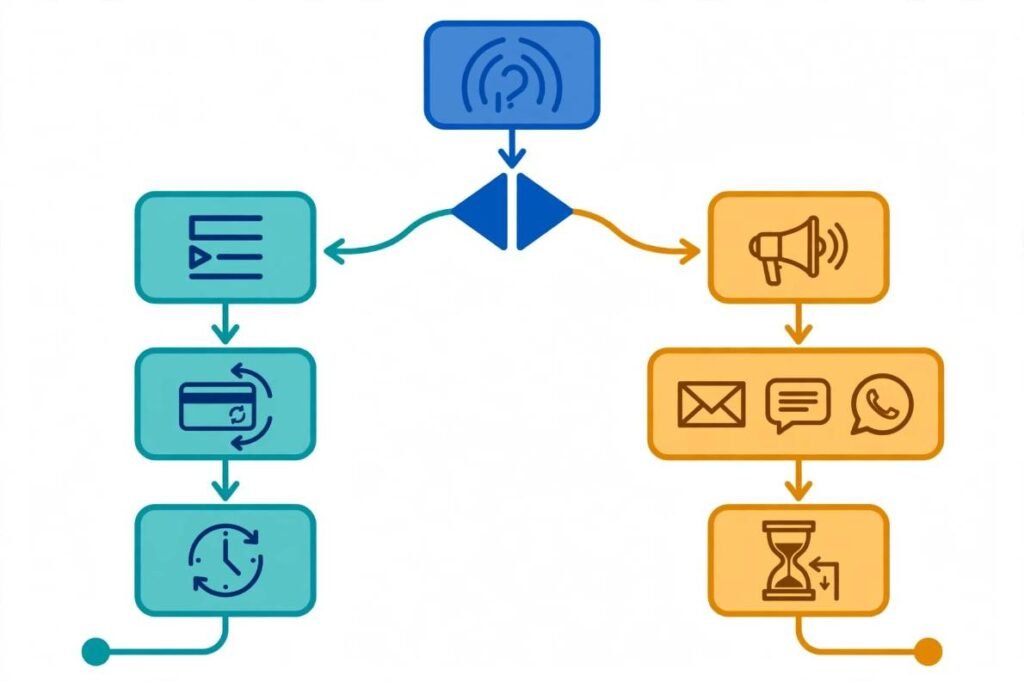
A high-converting recovery pipeline pairs silent backend retries with escalating customer reminders across a 14-day window. Every stage relies on five connected mechanisms.
Pre-Dunning Prevention and Card Network Updaters
The best failed payment is the one that never happens. Roughly 30% of recurring card declines stem from expired cards, reissued plastics, or bank mergers.
Before a billing cycle begins, I connect billing gateways to automated card updater networks like the Visa Account Updater program. These services pull fresh expiration dates and card numbers directly from issuing banks behind the scenes.
When a card cannot update silently, my workflow triggers a proactive alert 14 days before the renewal date. Updating billing details before an outage avoids awkward dunning emails altogether.
Failure Detection and Soft vs. Hard Decline Routing
The moment a charge fails, your system must catch the payment_failed webhook and inspect the exact decline code. Never lump all failures into a single retry queue.
| Decline Category | Common Gateway Codes | Root Cause | Automated Action |
| Soft Decline | insufficient_funds, processing_error, do_not_honor | Temporary cash shortage or network timeout | Enter silent Smart Retry queue + soft email nudge |
| Hard Decline | stolen_card, lost_card, invalid_account, closed_account | Permanent card termination or fraud block | Block retries immediately; route straight to outreach |
Card network rules strictly penalize merchants who repeatedly retry hard declines. According to Nacha operating rules and card brand mandates, hammering an invalid or closed account triggers merchant fines and lower authorization rates. My workflow routes hard declines straight to customer outreach on minute one.
Smart Retry Logic Based on Issuer Patterns
Early in my career, I configured a billing system to retry soft declines every 24 hours at midnight. Bank fraud filters flagged our merchant ID within a week, tanking our approval rates across healthy accounts.
Effective dunning and failed payment recovery workflow automation schedules retries using bank response codes and local payday cycles. If a card fails for insufficient_funds on the 12th, retrying on the 13th wastes an attempt. Scheduling that retry for the 1st or 15th—when US payroll deposits clear—doubles recovery rates.
Platforms like Stripe Billing use machine learning across billions of network transactions to pinpoint the exact hour an issuing bank is most likely to approve a retry.
Multi-Channel Escalation Without Login Friction
Silent retries handle roughly half of soft declines, while customer action solves the rest. However, sending an email that forces a user to remember their password and navigate four settings menus kills conversion.
Every automated email, SMS, or WhatsApp alert in my workflows includes a tokenized, no-login payment update link. Clicking that link opens a hosted billing page directly on their phone. Customers enter a new card or tap Apple Pay in under 15 seconds.
Automated Grace Periods and Clean Offboarding
Leaving unpaid accounts active indefinitely destroys your unit economics. If all retries and reminders fail by Day 14, the workflow automatically pauses or cancels the account.
When offboarding happens, stay compliant with FTC negative option guidelines regarding clear cancellation confirmations. Send a final receipt confirming the subscription pause alongside a one-click reactivation link. Many churned users return weeks later simply because that final email stayed in their inbox.
The 14-Day Automated Dunning Cadence That Saved Our MRR
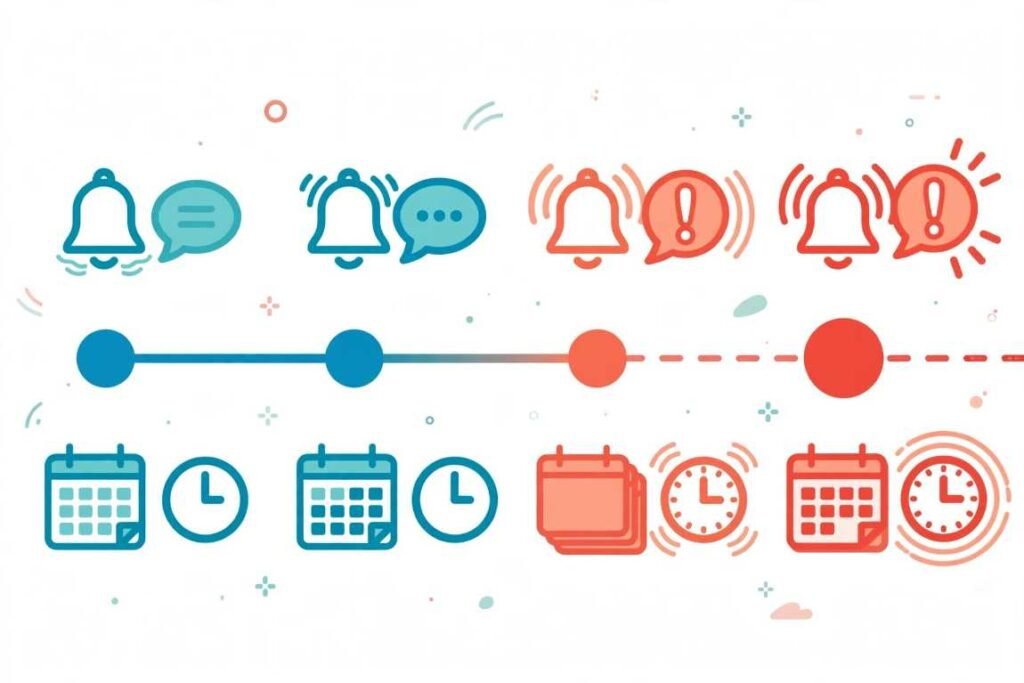
When I overhauled that $180K MRR account, we tested aggressive daily emails against a measured four-stage cadence. The four-stage sequence won by 22% in recovered revenue while generating zero spam complaints.
- Stage 1: Initial Notice (Day 0 — Immediate). The system triggers the first smart retry based on the decline code. Simultaneously, an automated email or in-app banner notifies the user of a minor billing hiccup in a friendly, helpful tone.
- Stage 2: Polite Nudge (Day 3). If the account remains unpaid, the gateway executes a second retry. The workflow dispatches a direct, courteous email paired with an SMS reminder containing the one-click payment update link.
- Stage 3: Urgent Warning (Day 7 to 10). The system runs a third targeted retry. Messaging shifts to a firm, neutral multi-channel alert warning that service suspension will occur in four days unless billing details update.
- Stage 4: Final Demand (Day 14). The gateway attempts one final retry before automatically suspending the account. A clear, final notice confirms the pause and explains exactly how to restore access.
Choosing Your Billing Automation Infrastructure

You do not need an engineering team of ten to build this pipeline. Choose your stack based on your current monthly transaction volume and billing complexity:
- Native Billing Gateways: Tools like Stripe, Chargebee, Recurly, and Paddle offer built-in smart retries and customizable email sequences right out of the box. I recommend starting here if you process under $250K in monthly recurring revenue.
- Dedicated Recovery Tools: Specialized add-ons layer behavioral machine-learning retry timing and deep SMS/in-app modals on top of your existing processor. These pay for themselves once a 1% lift in recovery equals several thousand dollars.
- Custom Webhook Workflows: Automation platforms like n8n, Zapier, or Pabbly Connect let you catch raw gateway webhooks and route them into your CRM, Slack, and Twilio. I use custom n8n pipelines whenever a company needs custom slack alerts for enterprise accounts exceeding $2,000 per month.
Frequently Asked Questions About Payment Recovery
1. What is a good failed payment recovery rate for subscription businesses?
An optimized automated recovery workflow typically recovers 60% to 80% of all initially declined recurring payments.
2. How many times should you retry a failed credit card payment?
You should retry soft declines three to four times across 14 days, while retrying hard declines zero times.
3. What is the difference between a soft decline and a hard decline?
A soft decline is a temporary issue like insufficient funds, whereas a hard decline is a permanent block like a stolen or closed card.
4. Does dunning automation work for ACH and bank transfers?
Yes, automated workflows handle ACH return codes by routing insufficient-fund errors to scheduled retries and invalid account numbers to immediate customer outreach.
Stop Letting Expired Cards Ghost Your Revenue
You worked too hard to win your customers to lose them over a reissued debit card or a temporary bank timeout. Open your payment gateway settings today, audit your current retry rules, and separate your hard declines from your soft declines before your next billing cycle runs.


2 thoughts on “Dunning and Failed Payment Recovery Workflow Automation: My Playbook”