Hardcoding ZIP-code tax tables into a checkout flow is a rite of passage that almost always ends in an audit headache. When I first wired up an API integration for automated sales tax calculation for a multi-state SaaS checkout, I quickly realized that rate lookup is the easiest part of the problem. The real engineering challenge lies in handling address precision, B2B exemptions, network timeouts, and post-payment ledger commits without slowing down customer conversion.
Connecting your checkout, billing engine, or ERP to a real-time tax API replaces brittle spreadsheet maintenance with deterministic tax logic. Across more than 12,000 US state, county, city, and special district jurisdictions, rates and product taxability rules shift constantly. A well-architected API integration evaluates street-level rooftops, checks economic nexus registration status, and records an immutable audit trail before a single dollar hits your bank account.
Why Static Rate Tables Break Modern Checkout Flows
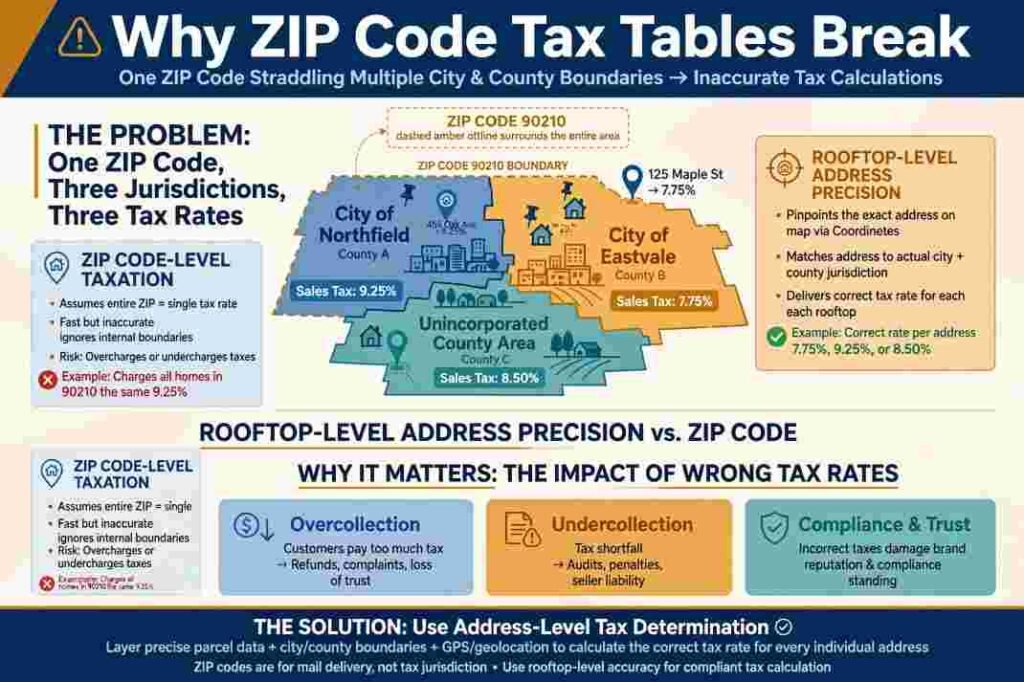
Relying on five-digit ZIP codes to estimate US sales tax creates immediate compliance drift. A single ZIP code in states like Colorado, Texas, or Washington frequently straddles multiple municipal boundaries with distinct local transit or stadium taxes. Resolving rates down to the nine-digit ZIP+4 or street-rooftop level requires a dedicated geospatial tax engine rather than a static database table.
Product taxability adds a second layer of complexity that static tables cannot solve. States tax physical goods, digital downloads, and saas subscription billing under completely different statutory rules. For example, New York taxes SaaS at full state and local rates, while California largely exempts electronically delivered software. Modern tax APIs solve this by mapping your internal SKUs to standardized product tax codes so the engine applies the right statutory rule automatically.
How the Two-Phase Tax API Workflow Operates in Production
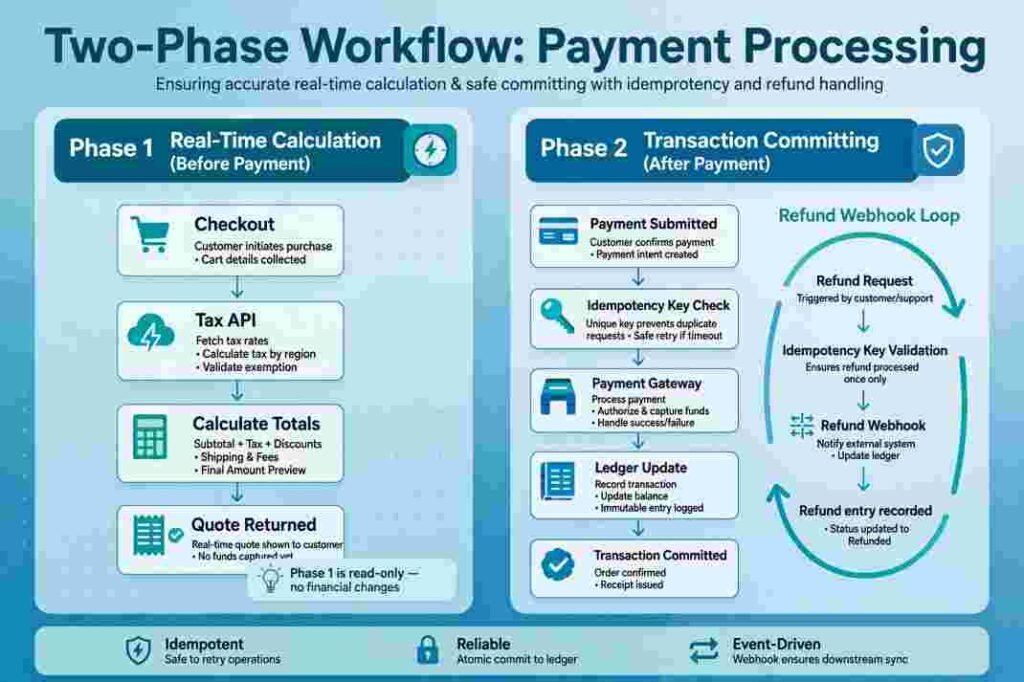
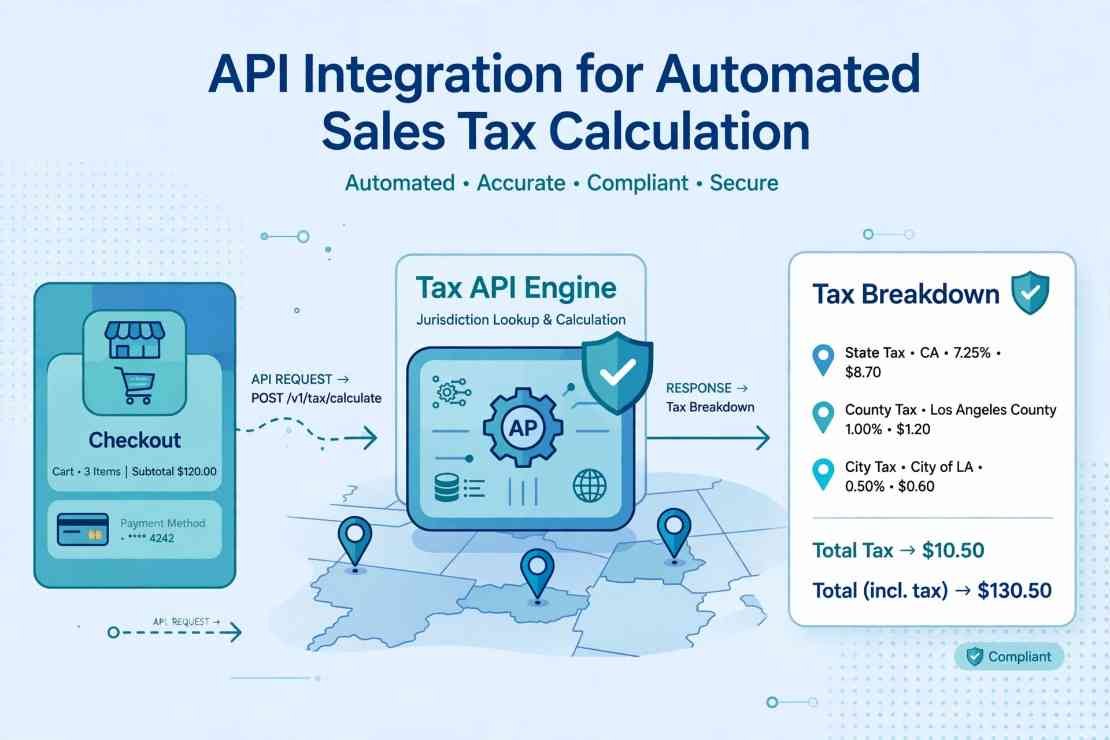
Every reliable tax engine follows a strict two-phase lifecycle: an ephemeral calculation call before payment capture, followed by a permanent commit call after payment succeeds. Merging these steps into one call pollutes your tax reports with abandoned carts and failed credit card attempts.
Phase 1: Real-Time Calculation and Address Resolution
During checkout, your backend collects the origin address, customer shipping or billing address, line-item amounts, and product tax codes. Your server dispatches a lightweight JSON payload to the tax API’s calculation endpoint.
JSON
{“currency”: “USD”,
“customer_details”: { “address”: {“line1”: “100 Congress Ave”,
“city”: “Austin”,
“state”: “TX”,
“postal_code”: “78701”,
“country”: “US” },
“tax_exempt”: false },
“line_items”: [ {“id”: “plan_pro_annual”,
“amount”: 24000,
“tax_behavior”: “exclusive”,
“tax_code”: “txcd_10103001” } ]}
In under 50 to 150 milliseconds, the API validates the address, verifies any B2B exemption certificates or VAT/GST registration numbers, and returns a jurisdiction-level tax breakdown. Your frontend renders this exact tax line item before charging the customer’s card.
Phase 2: Transaction Committing and Idempotency Safeguards
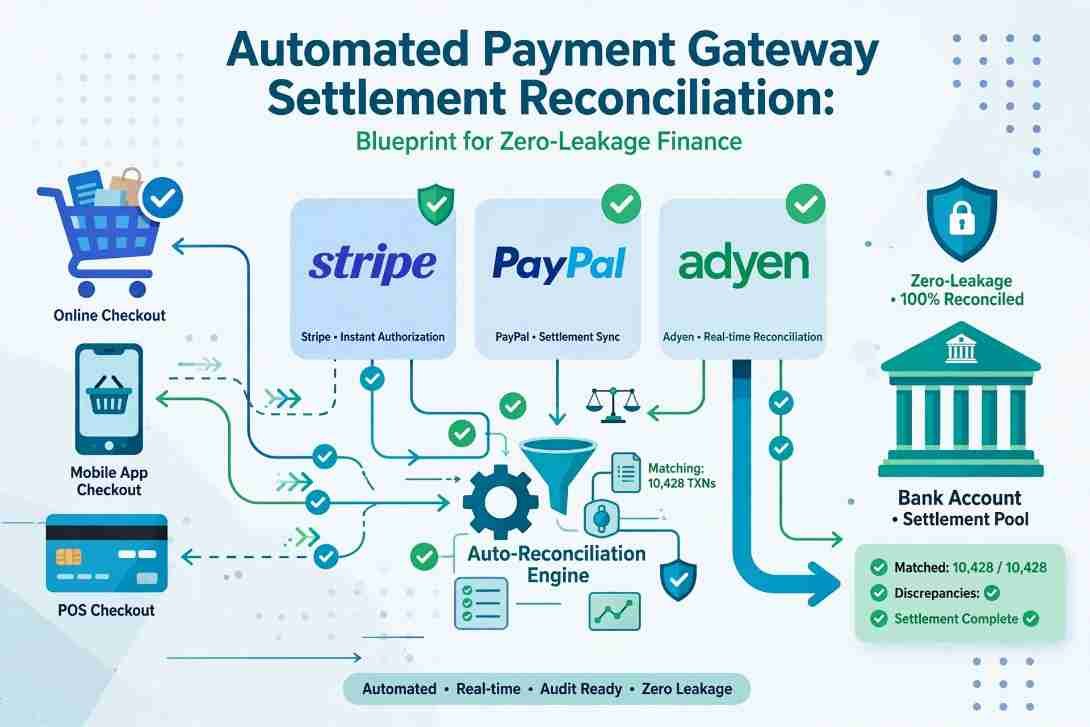
Once your payment gateway confirms a successful charge, your backend fires a second API request to commit the transaction to the tax provider’s compliance ledger. That committed record powers your monthly state returns and feeds downstream accounting workflows like your general ledger sync.
Always pass a unique idempotency key (such as your internal order ID) on the commit request. If a webhook fires twice or a network timeout triggers a retry, the tax API recognizes the key and prevents duplicate tax liabilities from appearing on your filing reports. You must also wire up webhook listeners for full and partial refunds so the engine records negative adjustments when money returns to a buyer.
Comparing Leading Tax Calculation APIs and Hidden Pricing Traps
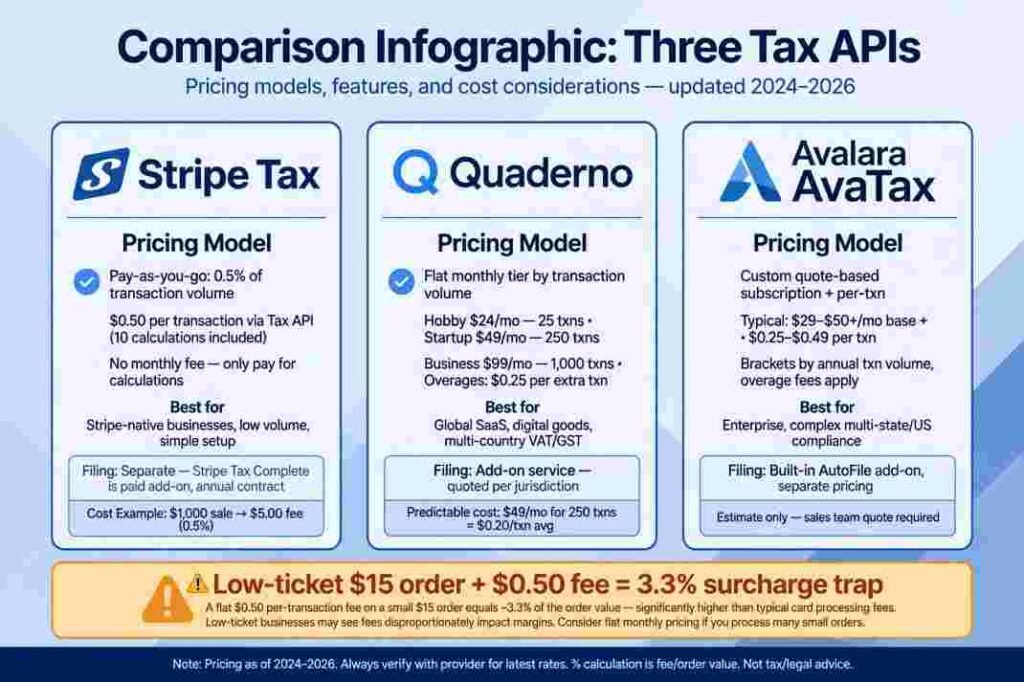
Selecting a tax calculation API comes down to your checkout architecture, transaction volume, and whether you want automated return filing bundled with calculation.
Stripe Tax vs. Quaderno vs. Avalara AvaTax
- Stripe Tax: Best for teams already running Stripe Checkout or Billing, though its standalone Stripe Tax Calculations API also works with external payment gateways. It tracks economic nexus thresholds out of the box and charges either 0.5% on native Stripe flows or $0.50 per committed API transaction (which bundles 10 calculation lookups).
- Quaderno Tax Engine: Built for global SaaS and digital commerce, the Quaderno REST API delivers sub-50ms calculation responses, automated B2B tax ID validation, and instant tax receipts. Pricing follows flat monthly tiers starting at $29 to $49 per month with a 10:1 ratio of API lookups to finalized transactions, avoiding percentage cuts of your gross revenue.
- Avalara AvaTax: Engineered for mid-market and enterprise operations running ERPs like NetSuite or SAP. Using the Avalara AvaTax REST v2 API, teams get deep exemption certificate management and customs duties across 190+ countries. Small US sellers can access Avalara Select starting at $79 per state per month (with a three-state annual minimum), while custom enterprise brackets scale by annual transaction volume.
The Low-Ticket Unit Economics Trap
Before signing a contract, model your effective tax-engine cost against your Average Order Value (AOV). On a $15 digital product, a flat $0.50 per-transaction API fee equals an effective 3.3% tax-calculation surcharge—more than your credit card processing fee. For high-volume, low-AOV businesses, tiered subscription APIs like Quaderno or percentage-based native checkout flows protect your gross margins far better than flat per-call pricing.
Four Production Edge Cases That Break First-Time Integrations
Even clean sandbox tests miss four real-world edge cases that regularly break production checkouts:
- Unregistered Jurisdiction Behavior: A compliant tax engine only calculates tax in states where you hold an active registration. If you test an address in a state where you have not crossed thresholds defined by the Streamlined Sales Tax Governing Board, the API intentionally returns $0.00 tax. Configure your test environment with mock registrations so QA verifies actual rate math.
- Checkout Timeout Fallbacks: Third-party APIs occasionally experience latency spikes. Wrap your calculation call in a strict 1,500ms timeout with a circuit-breaker fallback. Never let a slow tax lookup block a paying customer from completing checkout; instead, queue the order for asynchronous post-purchase tax reconciliation.
- Tax-Inclusive vs. Tax-Exclusive Flags: US buyers expect sales tax added on top of the listed price (exclusive), whereas UK, EU, and Australian buyers expect listed prices to include VAT or GST (inclusive). Explicitly set tax_behavior on every line item in your payload so international margins do not erode silently.
- Shipping and Handling Taxability: Roughly half of US states tax shipping charges when bundled with taxable goods, while others exempt delivery if stated separately. Pass shipping amounts in a dedicated shipping_cost parameter rather than lumping freight into a generic product SKU.
Frequently Asked Questions About Sales Tax APIs
1. How fast should a sales tax calculation API respond at checkout?
A production sales tax API should return rate calculations in under 50 to 200 milliseconds so checkout totals update without noticeable UI lag.
2. Does a tax calculation API automatically file my sales tax returns?
No, calculation endpoints only compute and record tax liabilities; automated return filing requires an add-on filing module or an all-in-one compliance tier.
3. What happens if a customer updates their shipping address multiple times during checkout?
Most providers bundle up to 10 calculation API calls per committed transaction, allowing multiple address recalculations before charging overage fees.
4. Can I use a sales tax API if I sell both B2B and B2C?
Yes, modern tax APIs accept customer tax IDs or exemption certificate flags in the request payload to zero-rate verified B2B purchases automatically.
Stop Hardcoding Tax Tables and Ship Your Integration
Manual rate maintenance is technical debt disguised as accounting. Start by mapping your top ten SKUs to standardized tax codes, spin up a sandbox key with your chosen provider, and wire up the two-phase calculation and commit endpoints with strict timeout fallbacks. Once your sandbox handles address validation, exemptions, and refund reversals cleanly, promote your keys to production and take sales tax math off your engineering backlog for good.