
A missed deadline can damage a legal case faster than months of careful preparation can repair it. Yet many law firms still depend on spreadsheets, scattered emails, and manual reminders to manage critical responsibilities.
Law firm case management task automation offers a more reliable approach. By connecting case milestones, attorney assignments, court deadlines, and document preparation through automated workflows, firms can reduce administrative work without sacrificing professional oversight.
The real advantage isn’t simply completing tasks faster. It’s building a consistent legal process where important responsibilities remain visible, accountable, and easier to manage.
How Does Automated Legal Case Management Actually Work?
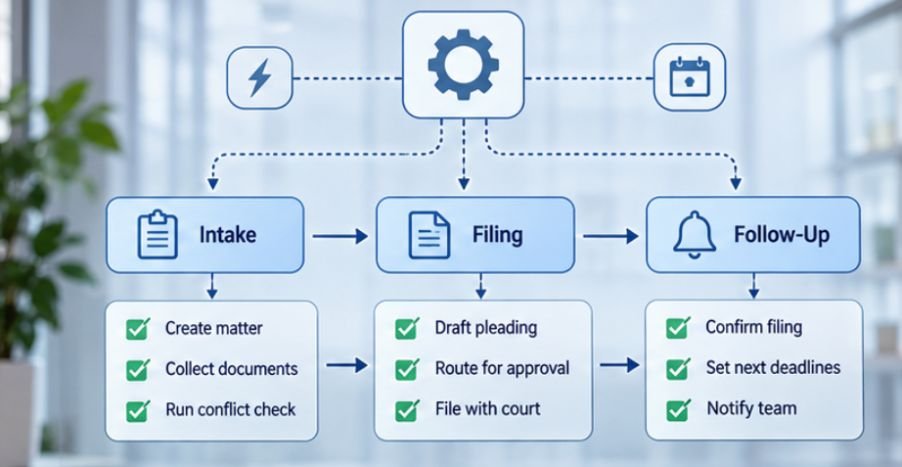
Effective automation depends on connected actions rather than isolated reminders.
Triggers Start the Next Legal Activity
A trigger is an event that instructs software to perform an action. When a client completes an intake questionnaire, the system might notify the assigned attorney and create a conflict-review task.
Similarly, changing a matter’s status to discovery can activate a standardized checklist covering document collection, interrogatories, and deposition preparation. These rules reduce the need for employees to manually initiate every assignment.
Task Dependencies Keep Cases Moving
Legal responsibilities frequently follow a specific sequence. A litigation team may need to finalize a complaint before filing it. Filing confirmation may then initiate tasks for service tracking and subsequent procedural obligations.
Workflow dependencies prevent later activities from appearing prematurely and help employees understand what needs to happen next.
However, the system should accommodate exceptions, including amended pleadings, delayed service, and changes to litigation strategy.
Automated Calendaring Supports Deadline Management
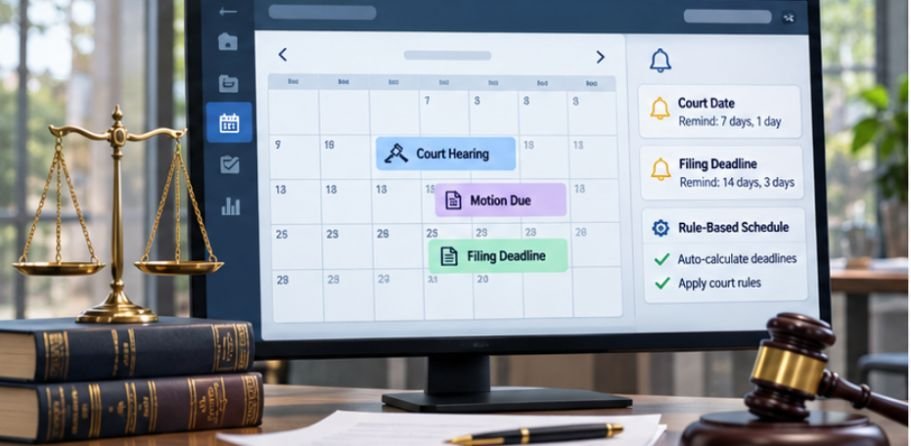
Court deadlines require more than ordinary calendar reminders.
Rules-based calendaring tools can calculate dates using applicable procedural rules, triggering events, and jurisdiction-specific requirements.
For example, Federal Rule of Civil Procedure 6 governs how certain federal civil litigation periods are calculated.
A firm’s calendar automation must distinguish between federal requirements, state procedures, local rules, court orders, and deadlines governed by different statutes.
Attorneys should independently verify critical dates, particularly when exceptions or unusual circumstances apply.
Document Templates Reduce Repetitive Drafting
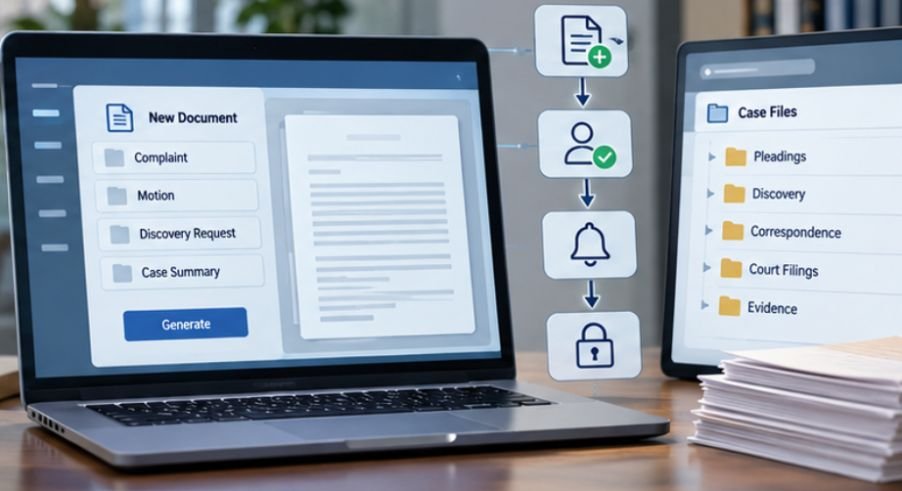
Legal document automation pulls approved client and matter information into standardized templates.
Engagement letters, discovery requests, routine correspondence, and internal case summaries can be prepared using existing records.
This saves repetitive data entry while improving consistency.
Nevertheless, generated documents require human review for factual accuracy, legal relevance, and appropriate language.
Which Legal Case Management Platforms Support Automation?
Several established platforms offer workflow management capabilities, although their features, integrations, and pricing vary.
MyCase for Repeatable Matter Processes
MyCase supports reusable workflows involving tasks, calendar events, and document-related activities.
Its templates are particularly relevant to practices handling similar case types, such as family law, immigration, or criminal defense. Firms should confirm which automation capabilities are included in their selected subscription.
Clio Manage for Structured Task Assignment
Clio Manage provides matter-based task lists and automated workflow options. Firms can configure rules that assign predefined task lists when qualifying events occur.
Its integrations can also support connections with other business applications, depending on the firm’s configuration.
To ensure that information remains consistent across connected legal platforms, firms should understand how to sync law firm client data between apps, including how to manage contact records, prevent duplicate entries, and maintain accurate client information across workflows.
Filevine for Complex Litigation Operations
Filevine provides customizable matter management and workflow capabilities suitable for practices requiring detailed reporting and sophisticated coordination.
It may be worth evaluating for litigation teams handling substantial document volumes or specialized processes.
Smokeball and monday.com as Alternatives
Smokeball combines practice management with automation-oriented productivity features.
Meanwhile, monday.com offers configurable project management and workflow automation, but firms must determine whether its setup adequately addresses legal confidentiality, matter management, and calendaring requirements.
The best choice depends on practice area, caseload, integration needs, and administrative resources.
How to Implement Legal Task Automation Without Disrupting Your Firm
A successful rollout starts with one manageable workflow rather than a complete technology overhaul.
Step 1: Identify Repetitive Tasks
Review completed matters and identify activities that regularly follow the same sequence.
Client onboarding, engagement-letter preparation, routine status updates, and internal document requests are practical starting points.
Firms can also use law firm past client reactivation automation to organize follow-up activities, identify opportunities to reconnect with former clients, and automate relevant outreach without relying on manual reminders.
Avoid automating activities requiring substantial legal interpretation.
Step 2: Map Responsibilities and Dependencies
Document every activity’s trigger, responsible employee, deadline, and completion requirements.
Determine which tasks can run simultaneously and which must wait for earlier steps. Include an escalation procedure for overdue or incomplete assignments.
Step 3: Create and Test a Workflow Template
Build a standardized workflow for one case category. Test it using fictional matters before applying it to active cases.
Confirm that assignments reach the correct employees, deadlines calculate properly, and repeated triggers don’t generate duplicate tasks.
Step 4: Measure the Results
Track operational performance before and after implementation.
Useful indicators include task completion rates, overdue assignments, administrative processing time, and workflow exceptions.
Consider this hypothetical example: if automation eliminates five minutes of repetitive work across 20 matters weekly, the firm saves approximately 100 minutes per week.
That calculation excludes implementation and maintenance time, but it provides a measurable starting point.
What Security and Compliance Risks Should Firms Consider?
Automation introduces risks when confidential information moves between applications. Poorly configured integrations can expose client records, create unauthorized access, or transmit information to unintended recipients.
The NIST Cybersecurity Framework 2.0 Small Business Quick-Start Guide provides guidance for evaluating organizational cybersecurity practices.
Law firms should prioritize role-based permissions, multifactor authentication, encrypted connections, reliable audit records, and vendor security reviews.
For a more comprehensive approach to protecting connected legal applications, firms should review how to secure law firm software integrations, including secure API connections, least-privilege permissions, vendor assessments, and ongoing access monitoring.
Professional obligations remain equally important. The ABA’s commentary on Model Rule 1.6 emphasizes safeguarding information relating to client representation.
Because state professional-conduct rules may differ, firms must evaluate applicable jurisdictional requirements. Automation should support attorney supervision, never replace it.
Frequently Asked Questions
1. Can small law firms benefit from case management automation?
Yes. Small firms can automate intake assignments, routine document preparation, task reminders, and client follow-ups without building complex custom systems.
2. Does legal workflow automation eliminate manual deadline checks?
No. Automated calculations support docket management, but attorneys must verify critical dates against applicable court rules, orders, and statutory requirements.
3. How much does law firm case management task automation cost?
Costs depend on software subscriptions, user licenses, integrations, implementation assistance, and ongoing support. Firms should compare total operating expenses rather than subscription prices alone.
4. Can existing legal software connect with automation platforms?
Often, yes. Native integrations, APIs, and approved third-party connectors can connect compatible systems. Availability depends on vendor capabilities, subscription plans, and security requirements.
Make Every Task Accountable
A dependable legal workflow shouldn’t rely on someone remembering to send the next reminder.
The strongest automation systems create predictable processes, clarify ownership, and make unfinished responsibilities easier to identify before they become serious problems.
For law firms considering law firm case management task automation, the smartest first move is identifying one recurring process that causes unnecessary delays.
Build a workflow, test its exceptions, verify its security, and measure the results.
Technology cannot guarantee a successful legal outcome. However, it can help ensure that administrative oversights do not interfere with the careful legal work every client deserves.