Learning how to connect Epic EHR with Salesforce Health Cloud using iPaaS saved my engineering team from a massive production failure three years ago. We initially tried building custom Apex callouts directly from Salesforce into Epic’s APIs, and the system choked within forty-eight hours of go-live. Governor limits tripped, patient records duplicated, and care coordinators lost real-time visibility into hospital admissions.
Moving to an Integration Platform as a Service (iPaaS) fixed those bottlenecks overnight. By placing dedicated middleware between Epic and Salesforce, you offload heavy payload translations, manage asymmetric token authentication cleanly, and keep clinical data flowing without writing brittle custom code inside your CRM.
Why Direct Point-to-Point Connections Break Under Hospital Loads
Point-to-point integrations fail in healthcare because Epic and Salesforce speak fundamentally different data dialects at vastly different velocities. Epic generates high-frequency clinical events—such as Admissions, Discharges, and Transfers (ADT)—alongside structured REST endpoints. Salesforce Health Cloud excels at care coordination and patient engagement, yet its multi-tenant architecture enforces strict API rate limits and Apex CPU execution caps.
When you force Salesforce to parse nested clinical payloads directly, transaction queues back up fast. Worse, HIPAA compliance mandates a signed HHS Business Associate Agreement and end-to-end encryption for every system touching Protected Health Information (PHI). A healthcare-ready iPaaS acts as an insulated shock absorber that handles compliance, throttling, and data normalization before a single byte touches Salesforce.
Choosing the Right Middleware: MuleSoft vs. Boomi vs. Workato
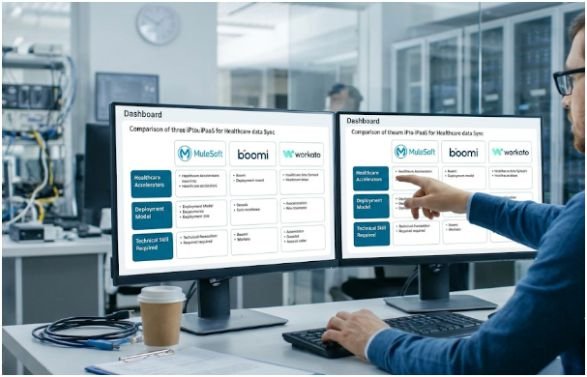
Before configuring endpoints, you need middleware suited to your hospital’s technical footprint. Over the past several deployments, I have tested the three leading platforms against live Epic Interconnect gateways and Salesforce orgs.
| Evaluation Criteria | MuleSoft (Anypoint Platform) | Boomi | Workato |
| Architectural Approach | API-led connectivity built for enterprise-wide API reuse | Low-code visual pipelines with hybrid cloud/on-prem routing | Event-driven automation “recipes” for rapid workflows |
| Healthcare Accelerators | Pre-built Epic, FHIR R4, HL7 v2, and Health Cloud templates | Native HL7/EDI parsers plus Boomi DataHub for patient MDM | Pre-built Epic and Salesforce connectors with community recipes |
| HL7 v2 & FHIR Support | Native MLLP listeners, FHIR validators, and DataWeave engine | Visual HL7 profile mappers and clean FHIR JSON handling | Strong FHIR REST support; HL7 v2 requires extra parsing steps |
| Required Team Skillset | High (requires specialized DataWeave and Anypoint developers) | Low to moderate (accessible to general integration analysts) | Low (Salesforce admins and IT analysts can maintain recipes) |
| Typical Starting Cost | Enterprise tier (often $2,000+/month billed annually) | Mid-market to enterprise (scales by connectors and messages) | Mid-market to enterprise (scales by task/recipe volume) |
If you are still evaluating vendors across broader clinical use cases, review our deep dive on the best iPaaS for syncing HL7 and FHIR data before signing an annual contract.
When I Deploy MuleSoft Anypoint Platform
Because Salesforce owns MuleSoft, its alignment with Health Cloud is unmatched. I recommend MuleSoft for large Integrated Delivery Networks (IDNs) that plan to reuse Epic APIs across mobile apps, patient portals, and payer networks. Its Accelerator for Healthcare ships with pre-mapped Canonical Data Models that translate Epic resources directly into Health Cloud objects, shaving roughly six weeks off initial development.
When Boomi Wins on Total Cost and On-Prem HL7
Boomi is my go-to recommendation when a health system needs heavy HL7 v2 routing without MuleSoft’s licensing overhead. You can install Boomi’s lightweight local runtime (“Atom”) directly inside a hospital firewall to listen to Epic Bridges over MLLP, then securely stream normalized data to Salesforce. Additionally, Boomi DataHub resolves duplicate patient identities before records ever hit your CRM.
When Workato Delivers the Fastest FHIR Workflows
When a clinic relies primarily on modern FHIR REST APIs rather than legacy HL7 feeds, Workato gets a proof-of-concept running in days. Care operations teams love how readable Workato recipes are. For example, an admin can easily adjust a recipe that triggers a Slack alert and SMS outreach whenever an Epic appointment cancels.
Step-by-Step Architecture to Connect Epic EHR and Salesforce Health Cloud
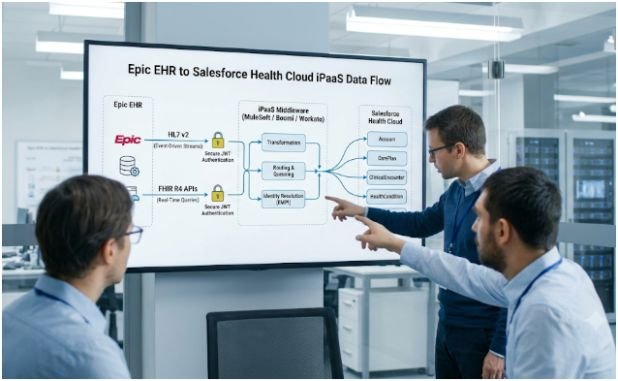
Once your iPaaS is provisioned and your BAA is executed, follow this five-step architecture to build a resilient, bi-directional sync.
Step 1: Split Your Traffic Between FHIR R4 APIs and HL7 v2 Streams
Never rely on a single protocol for every clinical workflow. In my builds, I split integration traffic into two distinct lanes based on data urgency:
- FHIR R4 APIs for On-Demand Queries: Use the HL7 FHIR R4 specification when a care coordinator opens a patient profile in Salesforce and needs live medication lists, allergies, or appointment slots.
- HL7 v2 Messages for Event-Driven Streams: Use HL7 v2 feeds (like ADT^A01 or ADT^A03) when Epic needs to push real-time inpatient admissions or discharges to Salesforce automatically.
Step 2: Configure Epic on FHIR Backend JWT Authentication
Epic does not allow static passwords or long-lived API keys for automated server-to-server traffic. Head over to the Epic on FHIR documentation portal and register a Backend System application.
Generate a 2048-bit or 4096-bit RSA public/private key pair. Upload the public key to Epic’s registration portal and store the private key inside your iPaaS secrets manager. Select only the exact FHIR scopes your workflow demands—such as Patient.Read, Condition.Read, or Appointment.Write—and record your non-production Client ID and OAuth2 Token URL. Your iPaaS will sign short-lived JSON Web Tokens (JWTs) using the RS384 algorithm to exchange them for one-hour bearer access tokens.
Step 3: Enable Salesforce Health Cloud Clinical Data Model and EMPI Rules
Inside Salesforce Setup, navigate to FHIR R4 Support Settings and enable the FHIR-Aligned Clinical Data Model. Per the Salesforce Health Cloud Clinical Data Model guide, Salesforce is deprecating older packaged EHR custom objects in favor of native standard objects like ClinicalEncounter, AllergyIntolerance, and HealthCondition.
Next, create a Salesforce Connected App configured with OAuth 2.0 and the JWT Bearer Flow so your middleware authenticates securely. Before syncing any test records, configure Enterprise Master Patient Index (EMPI) matching rules using Medical Record Numbers (MRN), date of birth, and legal name. Skipping EMPI configuration is the fastest way to flood Health Cloud with duplicate Person Accounts.
Step 4: Centralize Payload Mapping and HIPAA Audit Logging in Your iPaaS
Connect your Epic HTTP/FHIR connector and Salesforce connector inside the iPaaS canvas. Keep all data transformation logic—such as mapping Epic’s nested FHIR Patient.identifier arrays to Salesforce’s Account fields—strictly inside the middleware layer.
While building your error-handling framework, apply three production safeguards:
- Token Caching: Cache Epic OAuth access tokens in your iPaaS for 55 minutes rather than requesting a fresh token on every API call, preventing Interconnect throttling.
- Dead-Letter Queues: Route failed Salesforce upserts to an encrypted retry queue with exponential backoff.
- PHI Log Masking: Configure middleware logging policies to redact patient names, SSNs, and MRNs from plain-text system logs while preserving correlation IDs for HIPAA audits.
(Pro tip: Once your core patient demographics sync cleanly, you can extend this exact same middleware pipeline for automating insurance eligibility verification using X12 270/271 transactions.)
Step 5: Run Bi-Directional Sandbox Validation Before Go-Live
Point your iPaaS connectors to Epic’s non-production sandbox (interconnect-fhir-oauth) and a Salesforce Full Copy Sandbox. Test with Epic’s synthetic patient records rather than real patient data.
Verify full round-trip workflows: search for a synthetic patient in Health Cloud, pull their active conditions from Epic via FHIR R4, and book a follow-up visit in Salesforce that writes back to Epic’s schedule. Confirm that your EMPI rules merge updates onto the existing patient record instead of spawning duplicates.
Frequently Asked Questions
1. How long does it take to integrate Epic EHR with Salesforce Health Cloud?
A standard bi-directional iPaaS integration typically takes 8 to 14 weeks, depending on Epic Bridges interface queue times and security reviews.
2. Do I need Epic App Orchard approval to connect my own hospital’s Epic instance?
No, internal health system integrations only require local Epic analyst configuration and registration in your organization’s Epic on FHIR portal.
3. Can Salesforce Health Cloud receive real-time Epic discharge alerts?
Yes, by routing Epic Bridges HL7 v2 ADT messages through an on-premise iPaaS runtime directly into Salesforce Health Cloud.
4. Is an iPaaS required to connect Epic and Salesforce Health Cloud?
While not strictly mandatory, an iPaaS prevents Salesforce Apex governor limit failures and dramatically simplifies HIPAA audit logging and HL7 parsing.
Stop Duct-Taping Your Clinical Data Pipelines Together
Mastering how to connect Epic EHR with Salesforce Health Cloud using iPaaS comes down to respecting what each platform does best: let Epic remain the clinical system of record, let Salesforce drive care coordination, and let your middleware handle the heavy translation lifting in between.
Before writing a single mapping rule, audit your top three clinical workflows today and tag each one as either an on-demand FHIR lookup or a real-time HL7 event stream. That single architectural split will save your engineering team months of rework.