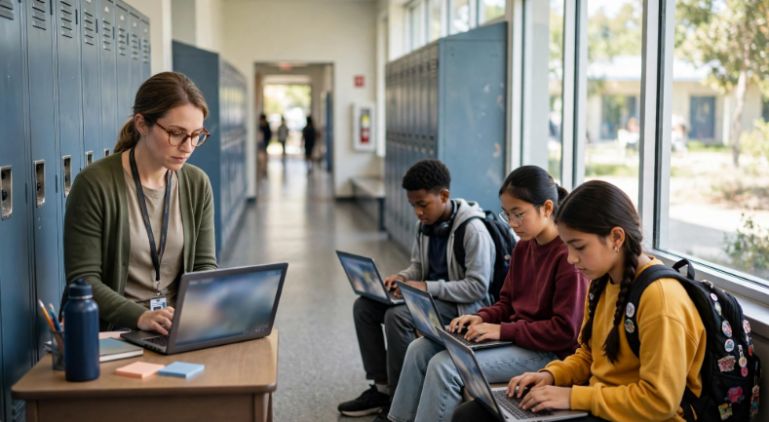
Remember when leaving class meant grabbing a wooden block, laminated card, or slightly questionable piece of paper with “HALL PASS” written across it? Securly Pass takes that very old-school routine and gives it a seriously digital makeover.
Instead of relying on paper slips and verbal permission, students can request digital passes while teachers and administrators gain a clearer view of who is out of class, where they are heading, and how long they have been away.
It sounds convenient, but convenience alone does not make school technology worthwhile. The bigger questions involve classroom interruptions, safety, privacy, ease of use, and whether digital monitoring actually solves the problems schools want it to solve.
What Are the Key Takeaways About Securly Pass?
Securly Pass turns the familiar hall-pass process into a centralized digital workflow. Students request permission, staff approve passes according to school rules, and authorized employees can monitor active passes from one system.
The biggest attraction is visibility. Instead of wondering whether several students are wandering the same hallway, staff can see current pass activity and notice unusually long or frequent trips.
The trade-off is that better visibility means collecting and managing student information. Schools therefore need clear policies explaining what is recorded, who can access it, and how the information should be used responsibly.
What Exactly Is Securly Pass and Why Are Schools Using It?
Securly Pass is a digital hall-pass and student movement management platform designed for K–12 environments. Many schools that previously relied on paper slips or systems such as e-Hallpass now use digital workflows to organize student movement.
At its simplest, the platform replaces a paper pass with a digital request. A student chooses a destination, the request follows the school’s approval rules, and the active pass becomes visible to authorized staff.
The appeal becomes obvious in a busy middle or high school. When hundreds or thousands of students move through a building every day, one paper slip tells one teacher that one student left class. A centralized digital system gives authorized staff a wider view.
How Does Securly Pass Work During a Normal School Day?
Securly Pass starts with a request rather than a handwritten note. A student selects where they need to go, and depending on school settings, a teacher or another authorized staff member can approve the trip.
Once the pass becomes active, staff can view details such as the student’s destination and how long the pass has been open. That makes it easier to notice unusually long trips without relying entirely on memory.
Schools can also use shared-device or staff-created workflows when students do not have their own devices available.
This type of connected workflow also reflects the direction of future SaaS integration for digital platforms, where separate processes can work together through a centralized system.
That flexibility matters in cafeterias, gyms, offices, and classrooms with different technology policies.
Why Can Securly Pass Make Hallway Management Easier?
Securly Pass gives schools something paper passes struggle to provide: patterns. One individual restroom trip means very little. Repeated trips, unusually long absences, crowded destinations, or recurring scheduling patterns can tell administrators where hallway procedures may need attention.
That information can also reduce some of the daily detective work teachers face. Instead of repeatedly asking where a student went or searching through handwritten logs, authorized staff can check the system.
This shift from manual tracking to connected workflows is similar to how Flow gear supports workflow automation and system integration across digital processes.
The real benefit is not simply digitizing a piece of paper. It is giving schools a more organized way to understand how students move during the school day while still leaving room for human judgment.
Can Securly Pass Actually Improve School Safety?
Securly Pass is not a replacement for teachers, emergency planning, door security, or good supervision. What it can provide is additional situational information.
During an ordinary day, administrators can see which students currently have active passes. During an unusual situation, knowing which students may be outside assigned classrooms can provide useful context.
Schools should still build broader safety practices around trusted guidance. Resources from the Cybersecurity and Infrastructure Security Agency can help districts think more broadly about K–12 safety, security planning, and risk reduction.
Technology should support a safety plan rather than become the entire plan. Staff training, communication procedures, drills, student support, and responsible supervision still matter regardless of how sophisticated a digital pass system becomes.
What Should Parents and Schools Know About Securly Pass Privacy?
Securly Pass naturally raises privacy questions because student movement information can become part of a digital record. Those questions deserve serious answers rather than a casual “the software is secure, trust us.”
Schools using educational technology should evaluate what information is collected, why it is needed, who can access it, and how long it is retained. The U.S. Department of Education’s student privacy guidance offers useful information about protecting student records when schools use online educational services.
For younger students, schools also need to understand children’s privacy requirements. The Federal Trade Commission’s COPPA guidance explains important responsibilities related to online services used by children.
A smart privacy policy should do more than satisfy a checklist. Students and parents should be able to understand what the school is recording and why.
How Does a Securly Pass Compare With a Traditional Hall Pass?
A paper pass wins the simplicity contest. It does not require Wi-Fi, accounts, synchronized rosters, software training, or another browser tab fighting for a teacher’s attention.
A digital system becomes more attractive when visibility and reporting matter. The difference looks something like this:
| Feature | Securly Pass | Traditional Paper Pass |
| Real-time visibility | Strong | Limited |
| Pass history | Automated | Usually manual |
| Usage limits | Configurable | Difficult to enforce |
| School-wide oversight | Centralized | Fragmented |
| Technology required | Yes | No |
| Privacy considerations | Higher | Lower |
| Reporting | Detailed | Minimal |
Neither method magically fixes student behavior. A poorly designed digital-pass policy can frustrate students just as easily as an ineffective paper system can be ignored.
The best system is the one supported by reasonable rules. Bathroom access, medical needs, accessibility accommodations, emergencies, and legitimate student circumstances should never be reduced to a rigid timer.
How Do You Use Securly Pass Step by Step?
Step 1: How Do Students Access Securly Passes?
Students usually access Securly Pass using login credentials or single sign-on options configured by their school.
Schools may connect student accounts through common educational authentication systems, which means students generally do not need to create random personal accounts.
The safest approach is simple: use only the school-provided login method and never share credentials with another student.
Step 2: How Do Students Request a Pass?
After signing in, the student selects an approved destination. Depending on the school’s configuration, that destination could include a restroom, library, counseling office, nurse, or another classroom.
The request may need teacher approval before the student leaves. Creating the request itself does not always mean permission has been granted.
Students should follow the school’s process rather than attempting to choose false destinations or work around pass restrictions.
Step 3: What Happens After a Pass Is Approved?
Once approved, the digital pass becomes active and authorized staff can monitor its status.
The student then travels to the approved destination and completes the trip according to school procedures.
A well-designed process should be quick enough that using the pass does not create more lost class time than the hallway trip itself.
What Are the Biggest Downsides of Securly Pass?
Technology dependency is the obvious one. Wi-Fi problems, account-sync issues, unavailable devices, forgotten passwords, or poorly trained staff can turn a simple restroom request into unnecessary drama.
Privacy is another concern. Even when schools use reputable providers, administrators should avoid collecting more information than necessary.
Finally, rules matter more than software. If administrators create unnecessarily strict limits without considering medical needs, disabilities, menstruation, emergencies, or other legitimate circumstances, students may view the platform as surveillance rather than organization.
Frequently Asked Questions
1. Is Securly Pass the same as e-Hallpass?
Yes, many schools that previously used e-Hallpass now refer to Securly Pass as the updated platform or branding.
2. Can students use it without carrying a device?
In many school configurations, yes. Teachers or staff may be able to create passes for students, while shared devices can support hall-pass workflows in common areas.
3. Does Securly Pass collect student information?
A digital hall-pass system naturally processes information connected to student accounts, pass activity, destinations, and school workflows.
4. Can Securly Pass stop students from skipping class?
It can make movement easier to document and patterns easier to notice, but no software completely prevents rule-breaking.
So, Is Securly Pass Hallway Genius or Digital Overkill?
Securly Pass can make a lot of sense for a busy campus where paper passes have become impossible to monitor consistently. Centralized visibility, digital records, configurable rules, and reporting provide advantages a clipboard simply cannot match.
Still, more data does not automatically equal better discipline or safer schools. The strongest implementation is transparent, flexible, privacy-conscious, and backed by actual human judgment.
My tip? Before obsessing over dashboards, decide what problem you are trying to solve. When technology supports a sensible school culture, it can be genuinely useful. When the rules become the star of the show, even the smartest hall pass starts feeling pretty dumb.